
Disclosure: This review contains affiliate links. If you buy through them, we may earn a commission at no extra cost to you.
If you have ever built a big prospect list in Apollo or Lusha, you know how the bill works. Every email you reveal costs a credit, and every phone number costs more. On Lusha, a single phone number costs five credits. The bigger your list, the faster your credits run out, and the more you hesitate before you export.
LeadOcean takes a different approach. It is a B2B people and company database that you use through a web app, a REST API, or a hosted MCP server that plugs into AI tools like Claude and ChatGPT. Its pitch is short: one price, no credits. LeadOcean says its database covers 996 million people and 73 million companies.
We tested LeadOcean on 17 November 2026 with an AppSumo Tier 3 account, working through its MCP server inside Claude. Our test audience was VP or Head of Sales at US software companies with 51 to 200 employees: we sized the market, pulled a sample of 10 people and looked up 5 of them in full. The whole test used 15 records.
In this LeadOcean review, we walk through every main feature, the real limits, who it suits, the regular pricing and the AppSumo lifetime deal, and how it compares with Apollo and ZoomInfo.
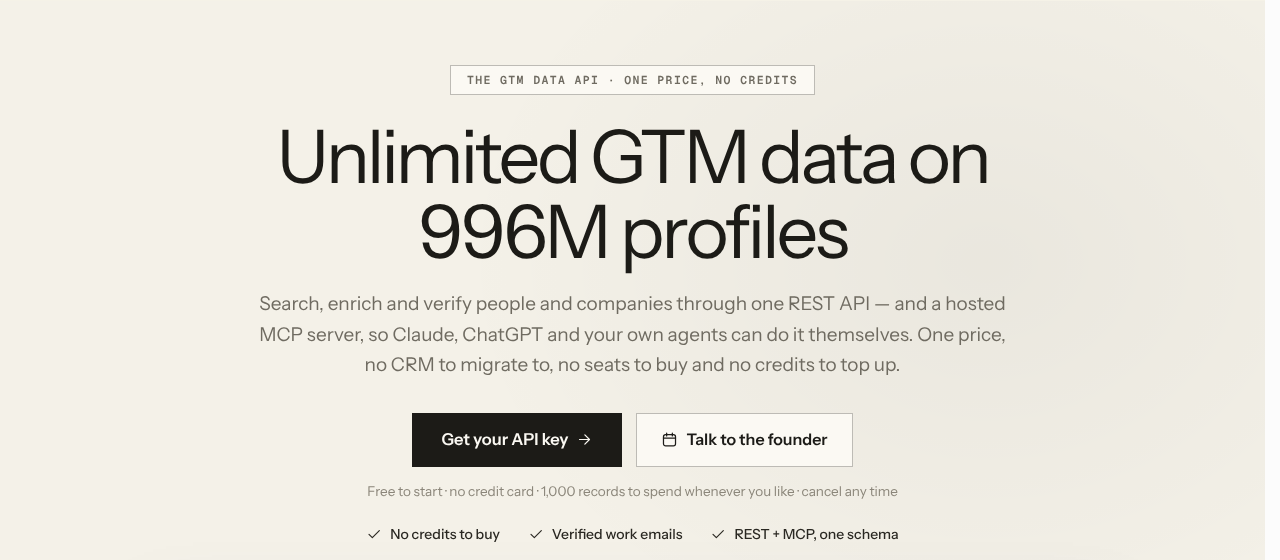
LeadOcean’s homepage. Source: leadocean.io, 17 Nov 2026.
Quick verdict
- Best for: lead generation agencies, founders and RevOps teams who need large lists and enrichment without paying per credit.
- Not for: teams that want email sequences, a dialer, a Chrome extension or intent data in the same tool.
- Price: free plan with 1,000 records; Solo at $97 a month; AppSumo lifetime deal from $49 once.
- Our rating: 8/10. Big volume, free counts and phone numbers at a flat price; check email status before you send.
What is LeadOcean?
LeadOcean is a B2B data provider: it gives you people and company records, verified work emails and phone numbers. It was founded in March 2022 by Ashish Rai in Toronto, Canada, and it is bootstrapped, with no outside investors.
Before LeadOcean, Ashish built cold email tools: ReachHQ for sending and VerifyHQ for email verification. He says the same problem kept coming up. Customers had to buy leads before they could send a single email, and per-credit data got expensive fast. LeadOcean is the data layer he built to fix that.
That focus matters. LeadOcean is not a CRM and not an email sequencer, and the company says plainly that it won’t become one. Its job is to fill the tools you already use: your CRM, your sending tool, your spreadsheet or your data warehouse.
You can use LeadOcean in three ways:
- Web app: build a search with the filter builder, pick your columns, preview the results and download a CSV.
- REST API: search and enrich from your own code or automation.
- Hosted MCP server: ask for leads in plain English inside Claude, ChatGPT, Cursor and other AI tools.
According to LeadOcean, the database holds 996 million people profiles and 73 million companies. Of those people, 424 million have an email address and 190 million have a phone number.
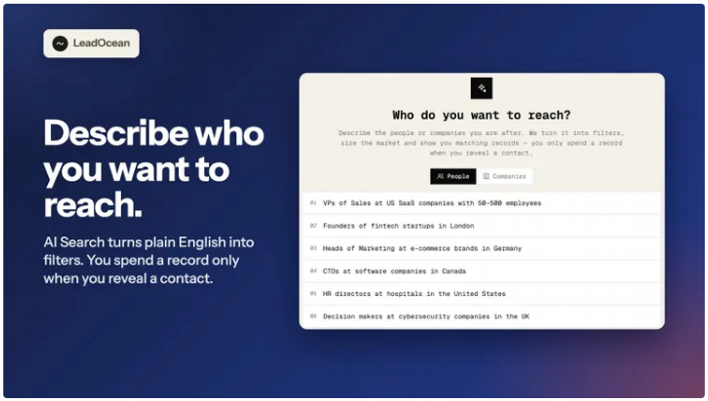
AI Search in the LeadOcean app turns a plain-English request into filters. Source: LeadOcean’s images on its AppSumo deal page, 17 Nov 2026.
Who is LeadOcean for?
LeadOcean suits anyone who needs a lot of B2B data and is tired of watching a credit balance. These five groups get the most out of it.
Lead generation agencies: Agencies build lists for many clients, so per-credit pricing eats their margin. LeadOcean’s monthly Agency plan explicitly allows use for “your own and your clients’ work”, and its exports are plain CSV files that drop straight into any sending tool.
Founders doing their own outbound: If you are the founder and the sales team, you need one clean ICP list and a way to send it. LeadOcean builds the list; a tool like ReachHQ, Instantly or Smartlead sends it.
RevOps and sales operations teams: Most CRMs are full of contacts with no phone number, an old job title or a missing email. LeadOcean’s enrichment fills those gaps from a LinkedIn URL, an email or a phone number.
Clay users: Clay charges per lookup from each data provider. LeadOcean can run as the first enrichment step in a Clay table, so you only pay other providers for the rows it could not fill.
AI agent builders and developers : If you are building an AI SDR or a research agent, it needs live B2B data. LeadOcean’s MCP server and API give Claude, ChatGPT, Cursor or n8n that data without any scraping.
Who should skip it: If you want one platform that finds leads, sends sequences, makes calls and shows buyer intent, LeadOcean is not that tool. You will need to pair it with other software, or look at an all-in-one platform like Apollo.
LeadOcean features: what you get
Here is every main feature, what it does and where its limits are.
1. Search people with 50+ ICP filters
People search is where most users start. You describe your ideal customer with filters, and LeadOcean returns the matching people.
The filters cover the job, the company and the contact details:
- Job: job title (include and exclude), seniority, job level and job function.
- Location: country, city and sales region.
- Company: industry (534 values), headcount, revenue, funding, investors, founded year, and technologies (105 categories).
- Contact: has email, has phone, and email status, so you can ask for verified emails only.
The logic is easy to follow. Different filters combine with AND, and several values inside one filter combine with OR. So “title is VP Marketing or Head of Marketing” plus “country is United States” gives you either title, but only in the US.
We ran a real search for this review: VP or Head of Sales, in the United States, at software companies with 51 to 200 employees. LeadOcean found 2,718 matching people. Adding a filter for verified or catch-all emails left 1,380 people at 1,061 different companies, and 2,196 people had a phone number. All of these counts were free.
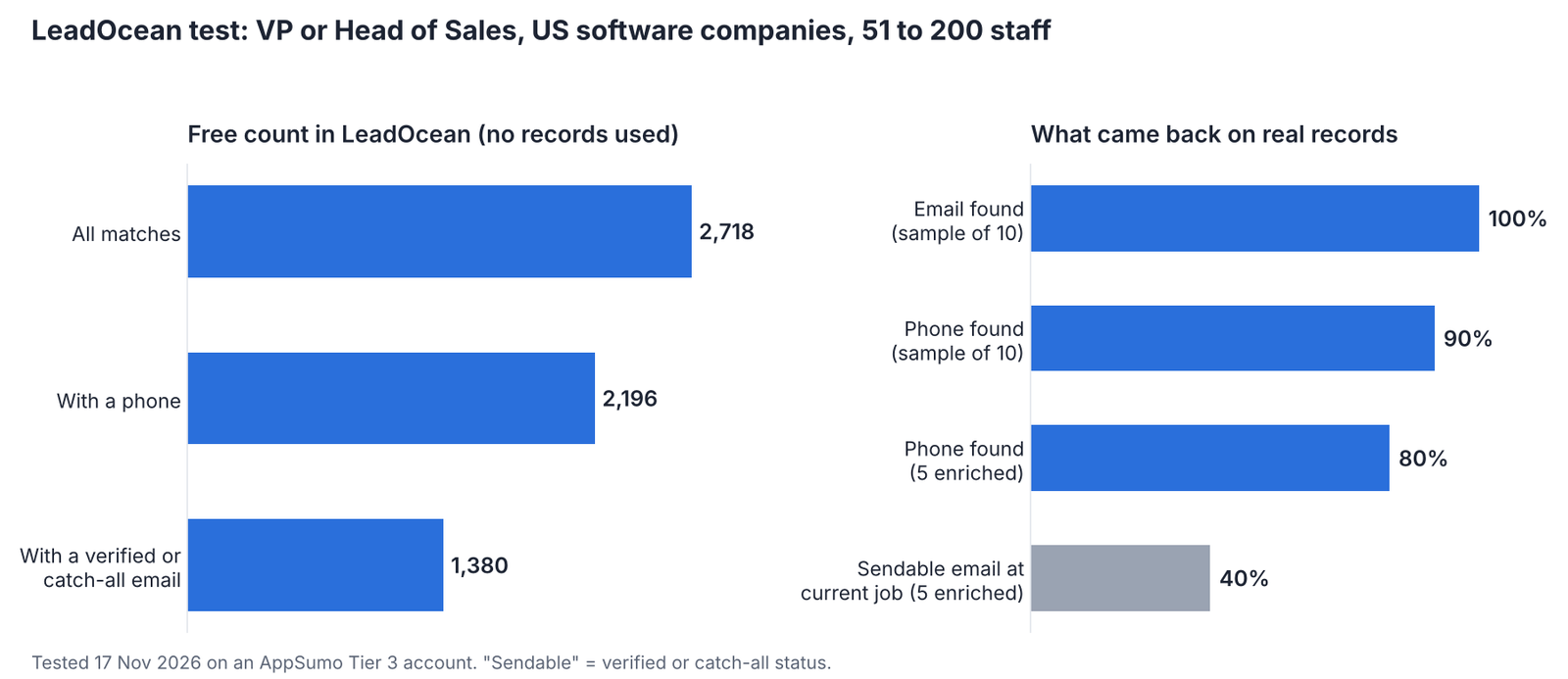
Our LeadOcean test: free counts on the left, results on real records on the right. Tested 17 Nov 2026.
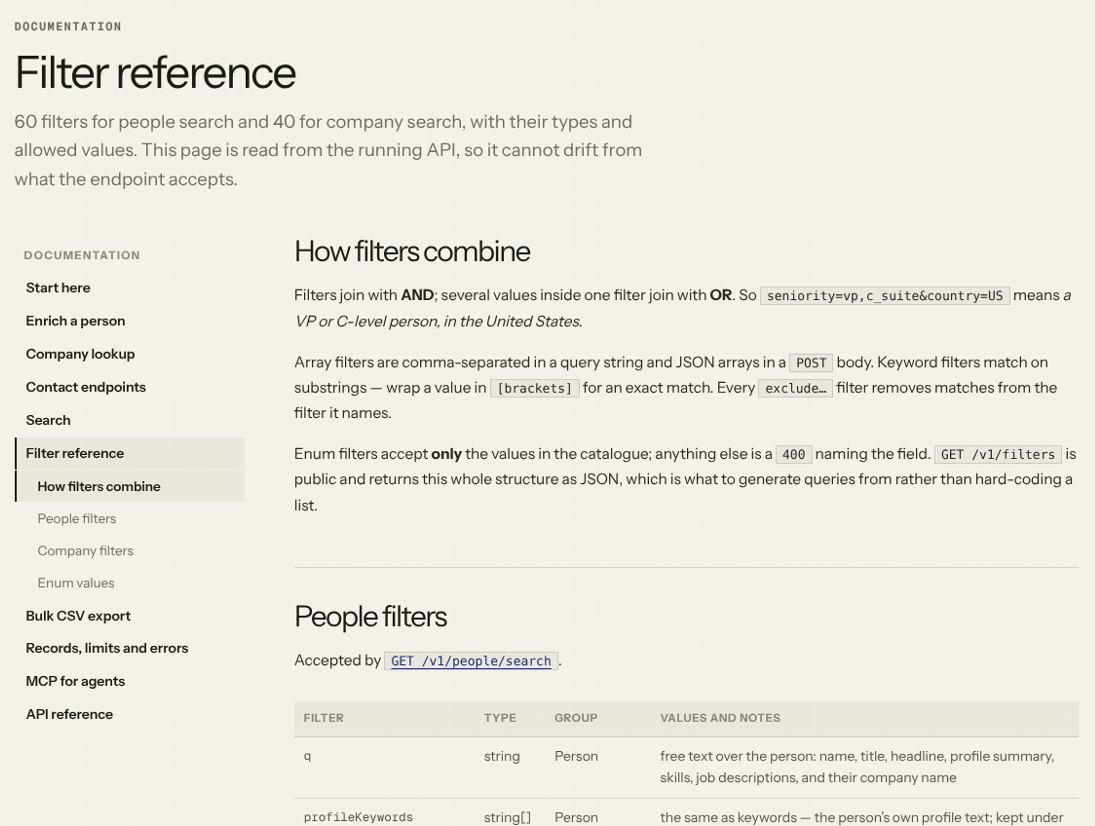
LeadOcean’s filter reference lists every people and company search filter. Source: leadocean.io/docs/filters, 17 Nov 2026.
2. Search companies and size your market for free
Company search works the same way, with company filters: industry, headcount, revenue in US dollars, funding, founded year, NAICS and SIC codes, headquarters location, technologies, and whether the company has contacts you can email.
The best part is that counts and breakdowns are free. Before you spend anything, you can see how many companies match, split by industry, headcount, or headquarters country or state. Agencies can use this to quote a list size to a client before they pull a single record.
You can also list the people at one company by entering its domain, which is handy for account-based outreach.

Database size as LeadOcean publishes it. Source: leadocean.io, 17 Nov 2026.
3. Enrich any lead from a LinkedIn URL, email or phone
Enrichment turns one piece of information into a full profile. You send exactly one identifier: a LinkedIn URL, a work email, a phone number or a LeadOcean person ID.
You get back the person’s profile, current role and company, work history, education, skills, certifications and contact details.
Two details make this more honest than most tools:
- If LeadOcean holds nothing on a person, you get “no match”, and it costs you nothing.
- Every response names which dataset answered, and fields LeadOcean doesn’t know come back empty instead of guessed.
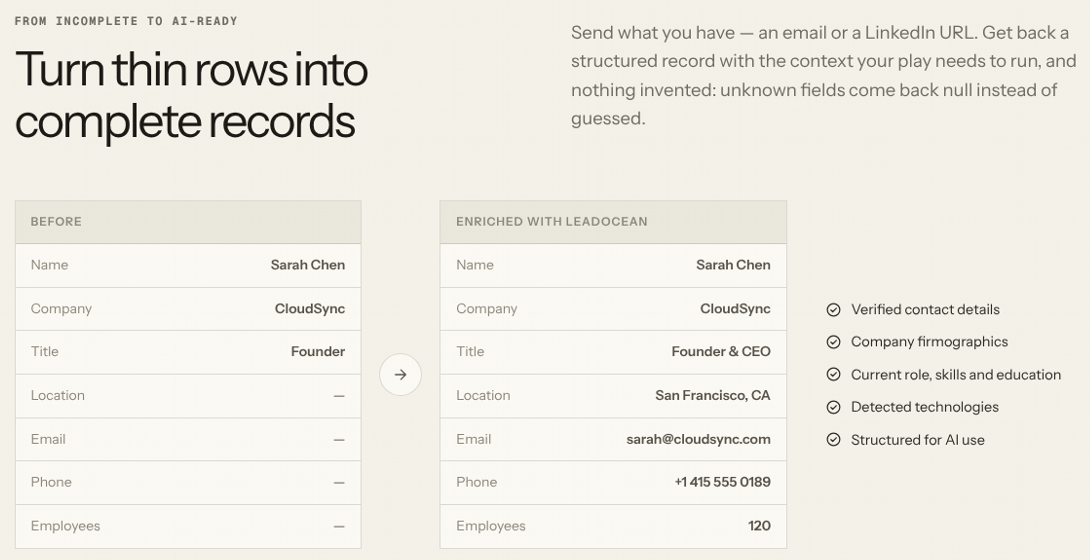
LeadOcean’s own before-and-after example. The record is a sample, not a real person. Source: leadocean.io, 17 Nov 2026.
4. Find work emails with honest verification labels
Every email in LeadOcean carries one of 13 statuses. The main ones are verified, catch-all valid, catch-all, risky, invalid and untested.
The labels mean what they say. “Verified” means LeadOcean checked the address. An address that only a data supplier vouched for is marked “untested”, not dressed up as verified. “Catch-all valid” means the mailbox was confirmed on a Microsoft 365 or Google Workspace domain that accepts all mail. Other labels include catch-all, risky, unknown, invalid, role (a shared inbox like sales@), disposable and spam trap, so you can leave out anything you don’t want to send to.
LeadOcean’s own advice is to send to verified and catch-all valid addresses, and to drop invalid, spam trap, abuse and disposable ones. That advice alone will protect your sending domains.
We didn’t run a bulk bounce test, so we won’t quote a bounce rate. Instead, we looked at the statuses on real records. In a sample of 10 sales leaders, all 10 had an email on file, and the best address was verified for 1, catch-all for 4, untested for 4 and invalid for 1. When we looked up 5 people in full, only 2 had a ready-to-send work email at their current company: one verified and one catch-all. One was a pattern-based guess (“derived”), one was invalid, and one person only had addresses from old jobs.
The lesson: filter by email status, check that the address is at the person’s current company, and run untested addresses through a verifier before you send.
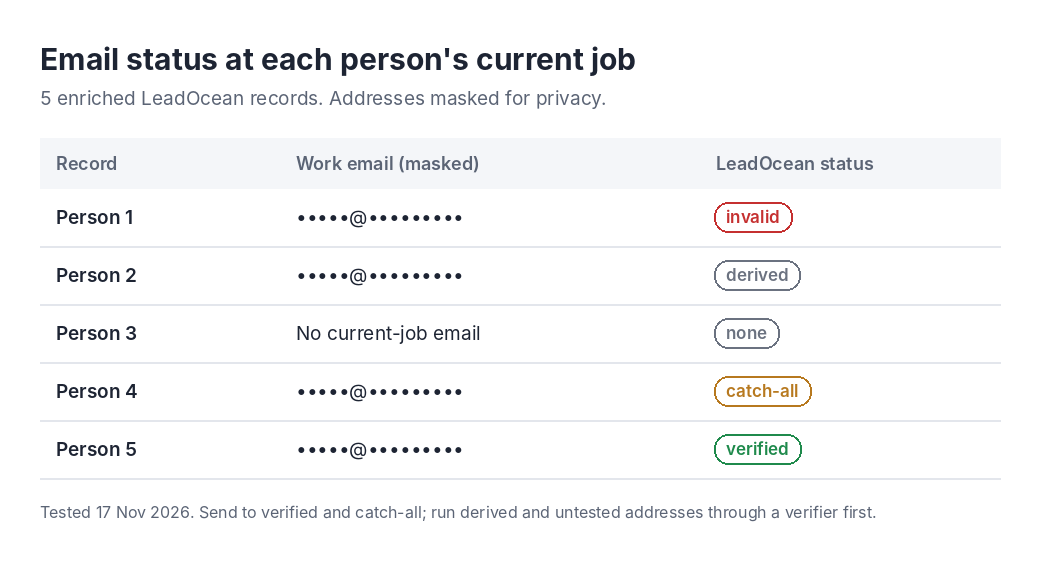
Email status at each person’s current job, from our 17 Nov 2026 test. Addresses are masked.
5. Get phone numbers for cold calling
Phone numbers are part of every LeadOcean plan, with no extra charge per reveal. That is a big difference from tools like Lusha, where one phone number costs five credits.
LeadOcean returns three types of number: mobile, direct and office, with the best number listed first. On the AppSumo lifetime deal, phone reveals come with a monthly allowance, from 100 a month on Tier 1 up to 15,000 on Tier 5.
LeadOcean’s own docs are candid that a phone number can be shared, for example by a team or an office. Treat a match as strong evidence, not proof, and confirm on the first call.
A full contact lookup can return personal emails and phone numbers as well as work details. If you sell into the EU or UK, check the local rules before you call or email someone on a personal line.
In our test, 9 of the 10 sampled people had a phone number on file. Of the 5 we looked up in full, 4 came back with at least one number, and one person had two mobiles and an office line. Several numbers were labelled “unknown” rather than mobile, direct or office, so check the label before you plan a calling session.
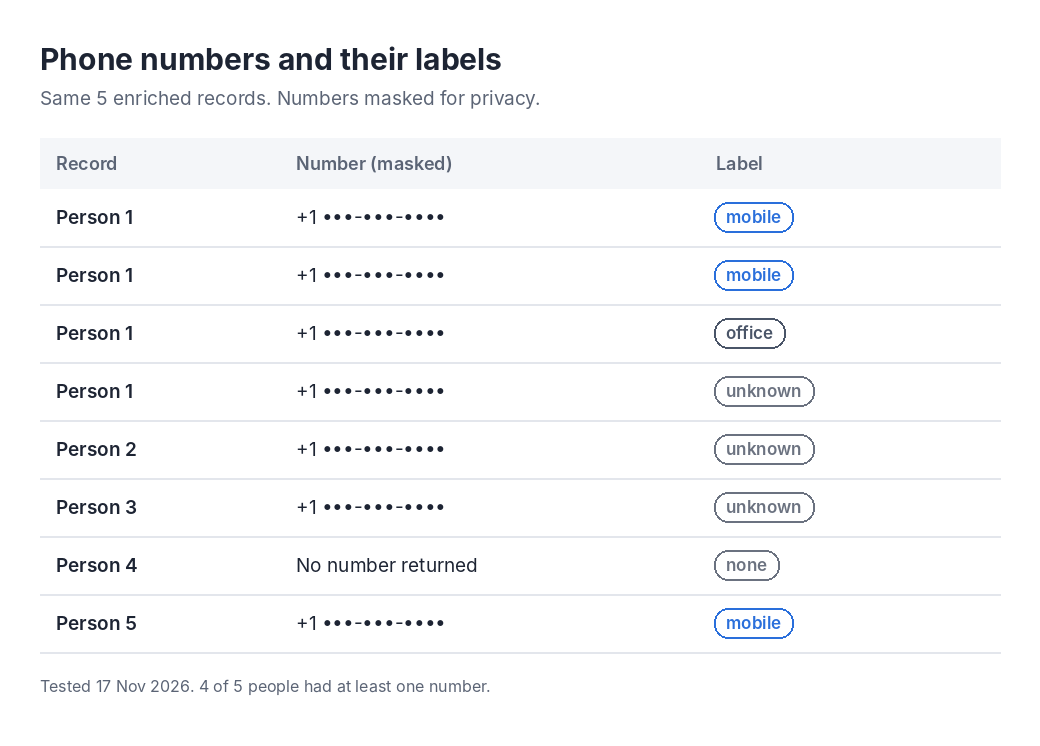
Phone numbers and their labels from our 17 Nov 2026 test. Numbers are masked.
6. Reverse lookup: who is behind this email or number?
Reverse lookup works the other way around. You give LeadOcean a work email or a phone number, and it tells you the person’s name, job title, company, company domain and LinkedIn URL.
This is useful for inbound leads. When someone fills in a form with only their email, you can find out who they are and how big their company is before you reply. Each lookup counts as one record.
7. Export up to 50,000 leads per file
When your list is ready, you export it as a CSV, from the web app or through the API. On the monthly plans, one file holds up to 50,000 rows, and you can export up to 500,000 rows a day. On the AppSumo lifetime deal, the daily export allowance runs from 5,000 rows on Tier 1 to 150,000 on Tier 5.
You can pick one of two column presets or choose your own columns:
- Full: 45 columns, including emails and phones.
- Search: 27 columns, for lighter lists.
LeadOcean emails you when the file is ready. The download link works for 24 hours, and the file is kept for 7 days. Because it is a plain CSV, it imports straight into HubSpot, Instantly, Smartlead or any other tool.
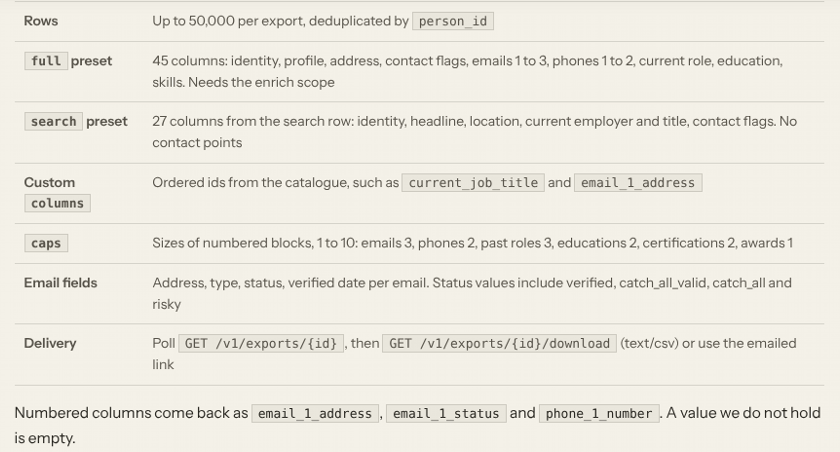
What a LeadOcean bulk export can include, up to 50,000 rows a file. Source: leadocean.io/product/bulk-export, 17 Nov 2026.
8. No credits: how LeadOcean’s “pace” pricing works
This is the feature that makes LeadOcean different, so it is worth understanding properly.
One record is one person or one company you receive. A search page of 25 people counts as 25 records. Enriching one person counts as one enrichment, and revealing a phone number counts as one phone reveal.
Instead of a credit balance that runs out, each plan has a pace: a number of records per time window, such as every 5 hours and every week. When you use up a window, it refills. You are never charged extra, and you never have to buy a top-up.
When you hit your pace, your requests slow down until the window refills. LeadOcean’s founder puts it simply: “Your key never stops.” On the AppSumo Tier 3 account we tested, the account settings spell it out: past your pace, requests slow to one a minute until the window resets. They are never refused, and there is no monthly record cap.
Some actions are free and never count:
- Counts and breakdowns.
- Searches that return nothing.
- Enrichments with no match.
- Requests rejected for rate limits.
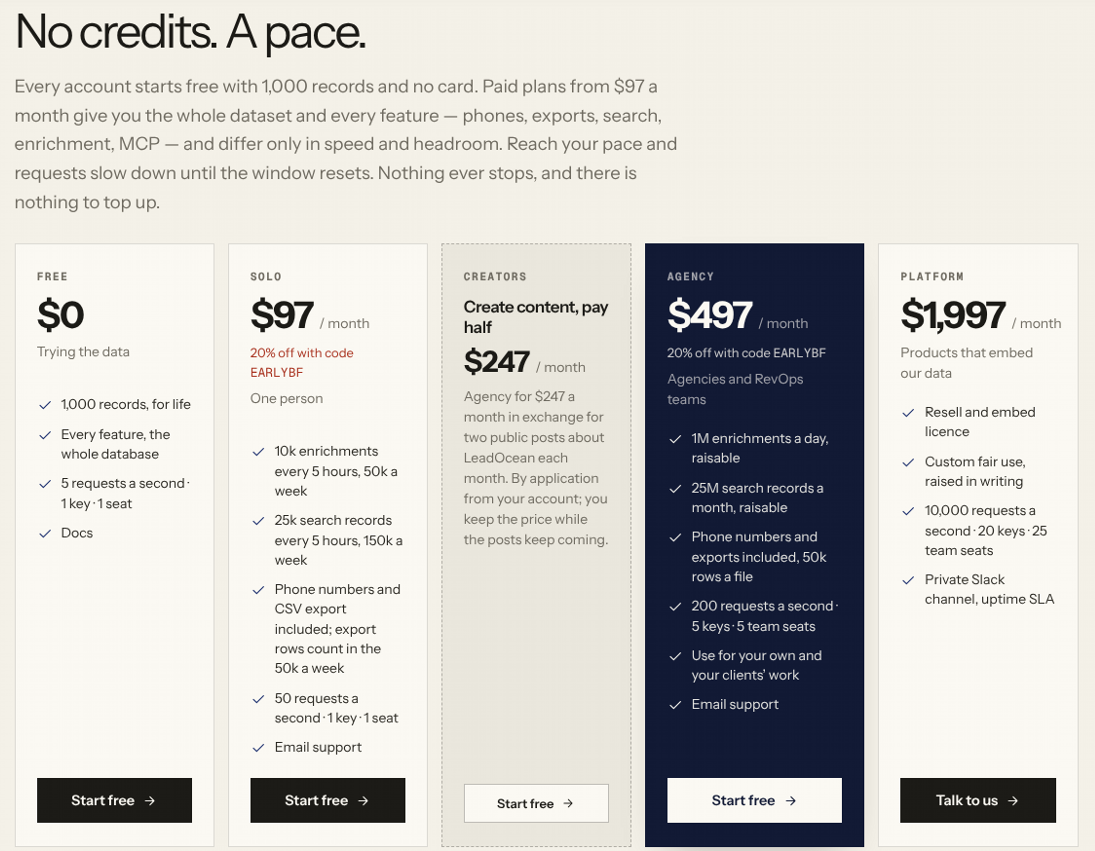
LeadOcean’s monthly plans set a pace instead of selling credits. Source: leadocean.io, 17 Nov 2026 (the 20% code shown was a Pre-Black Friday offer).
9. Prospect from Claude or ChatGPT with the MCP server
LeadOcean runs a hosted MCP server, which lets AI assistants use its data directly. You add LeadOcean as a remote MCP server in your AI tool, sign in with your LeadOcean account, and start asking for leads in plain English. There is no API key to paste and no code to write.
It works with Claude, Claude Code, ChatGPT, Codex, Cursor, VS Code, Windsurf and n8n. The MCP tools let the assistant:
- Count leads and companies for free.
- Search leads and companies.
- Get the full record for one lead or company.
- Find a phone number.
- Export leads to a file.
Try a prompt like this: “Find 50 heads of growth at Series A fintech companies in the UK and export them.” The assistant runs the search, shows you the list and creates the export.
The MCP server is included on every plan and every AppSumo tier, and it shares the same limits as the app and the API.
This is how we ran every test in this review. We asked Claude in plain English, and it used LeadOcean’s MCP tools to count the market, pull a sample and look people up, with no API key and no code. For contrast, Apollo’s own MCP connection on its Free plan answered “plan does not include” to the same kind of search.
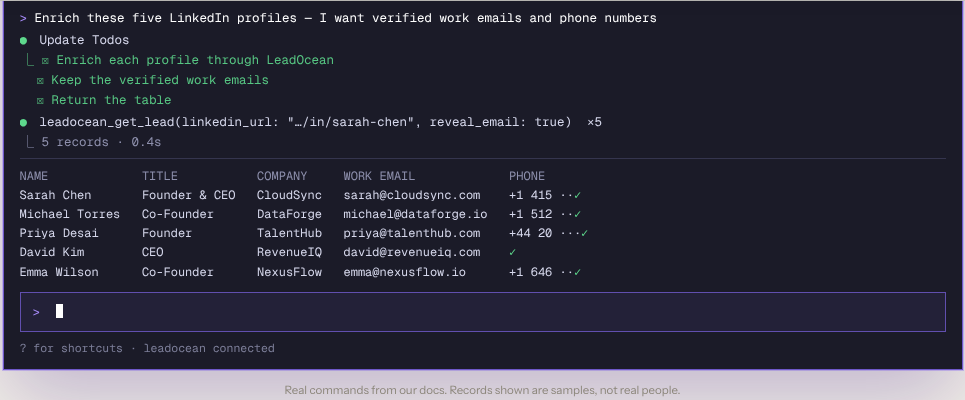
LeadOcean’s MCP tools working inside Claude Code. The records are samples, not real people. Source: leadocean.io, 17 Nov 2026.
10. A REST API built for developers
If you code, everything in the app is also available over a REST API. There are endpoints for people search, company search, enrichment, contact lookups, exports, and your account and usage.
The API is simple to start with. You authenticate with an API key in a request header, and LeadOcean publishes an OpenAPI spec and an llms.txt file so AI coding tools can write the integration for you.
Speed depends on your plan:
Plan | API speed |
|---|---|
Free | 5 requests per second |
Solo | 50 requests per second |
Agency | 200 requests per second |
Platform | 10,000 requests per second |
AppSumo Tiers 1 to 5 | 5 to 200 requests per second |
Error messages are clear, and failed or rate-limited requests are never counted against you.
A people search is a single GET request, with your API key in the x-api-key header:
curl “https://api.leadocean.io/v1/people/search?limit=25” \
-H “x-api-key: $LEADOCEAN_API_KEY”
You add your filters to the same request, and limit sets how many people come back per page, up to 100. Source: LeadOcean API docs, 17 Nov 2026.
11. Integrations: Clay, Zapier, Make, n8n and your CRM
LeadOcean connects to other tools through its API, with ready-made recipes for the popular ones.
- Clay: add one HTTP column that enriches each row with LeadOcean first, so you only pay other Clay providers for the rows it couldn’t fill.
- Zapier: a webhook step can enrich every new HubSpot contact or Google Sheets row. This needs a paid Zapier plan, and there is no native LeadOcean app in Zapier.
- Make and n8n: recipes for the same kinds of automations.
- CRMs and sending tools: recipes for HubSpot, Salesforce, Pipedrive, Attio, Instantly, lemlist, Smartlead, HeyReach and more.
The founder’s other products fit in too: ReachHQ for sending cold email and VerifyHQ for email verification.
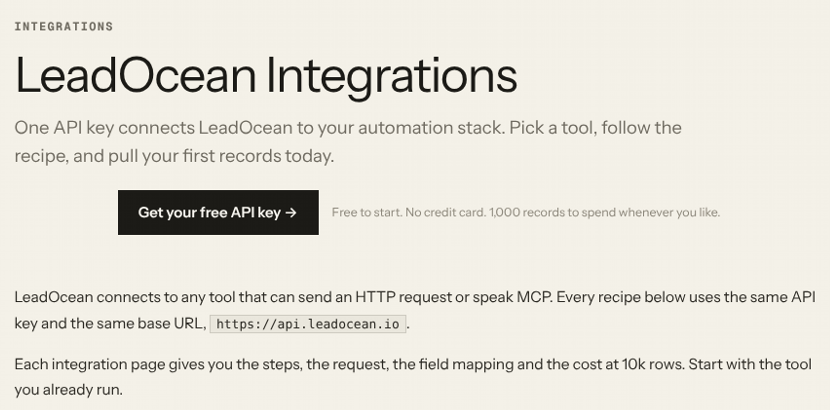
LeadOcean’s integrations hub. Source: leadocean.io/integrations, 17 Nov 2026.
12. Data sources, privacy and opt-out
LeadOcean combines more than 20 licensed, public professional and proprietary sources into one schema. Every API response tells you which dataset answered, and unknown fields come back empty instead of guessed.
On privacy, LeadOcean relies on legitimate interests as its lawful basis under GDPR and works with business-context data only. Anyone can ask for their record to be removed on LeadOcean’s removal page, and it is suppressed from every response immediately.
Customers agree not to use the data for consumer marketing, or for credit, employment or insurance decisions. If you sell into regulated markets, check that these terms fit your use.
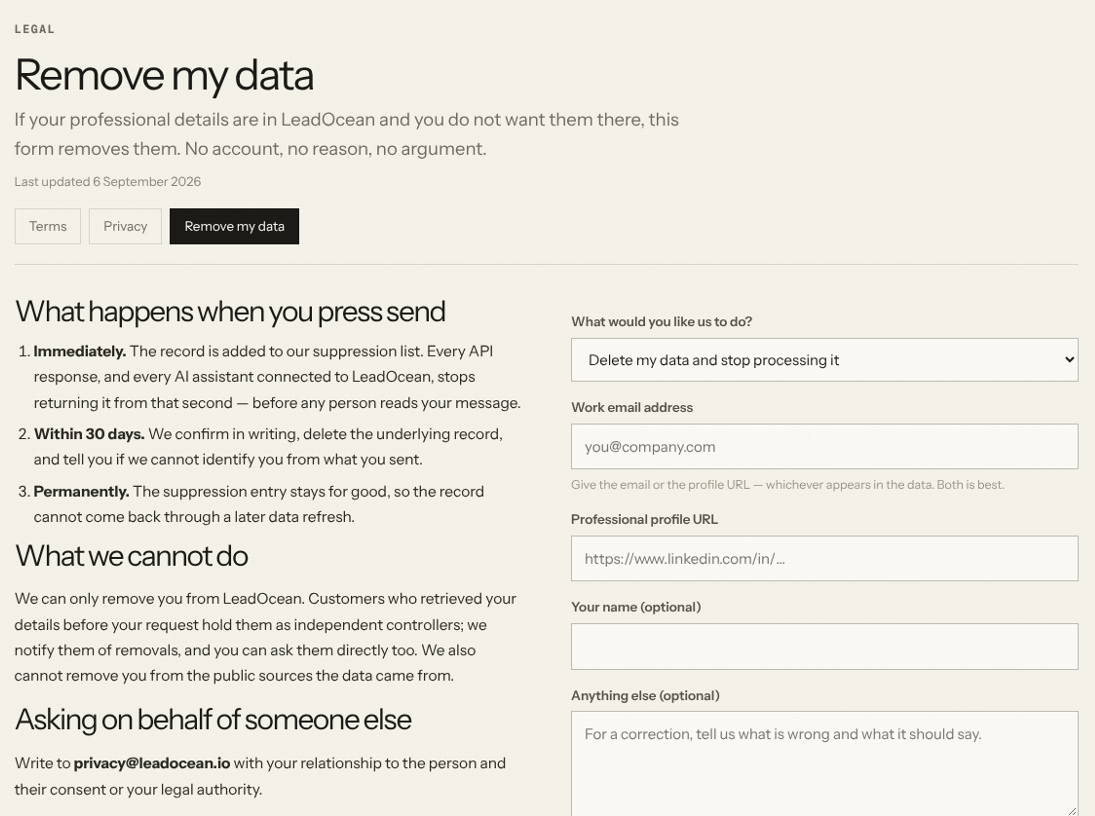
Anyone can ask LeadOcean to remove their record, with no account needed. Source: leadocean.io/legal/remove, 17 Nov 2026.
What LeadOcean does not do
LeadOcean is honest about its gaps, and you should know them before you buy:
- No Chrome extension for LinkedIn.
- No buyer intent data or website visitor tracking.
- No org charts.
- No email sequences.
- No dialer.
In practice, you pair LeadOcean with a sending tool (ReachHQ, Instantly or Smartlead) and your CRM. Some buyers have asked for built-in deduplication across exports. For now, the app keeps a list of records you have already viewed and lets you exclude IDs, so you can avoid pulling the same people twice.
LeadOcean pricing and the AppSumo lifetime deal
LeadOcean sells monthly plans on its own site and a one-time lifetime deal on AppSumo.
Monthly plans
Plan | Price | API speed | Good to know |
|---|---|---|---|
Free | $0 | 5 requests per second | 1,000 records, once, no card needed |
Solo | $97 a month | 50 requests per second | Monthly, cancel any time |
Agency | $497 a month | 200 requests per second | 5 API keys, 5 seats, client work allowed |
Platform | $1,997 a month | 10,000 requests per second | For products that embed LeadOcean data (resell and embed licence) |
AppSumo lifetime deal
On AppSumo, you pay once and keep access for life. There are five tiers, and every tier includes people search, company search, verified work emails, phone reveals and the MCP server.
Tier | Price (list) | Search records | Enrichments | Phone reveals | CSV export | API speed and keys | Seats and support |
|---|---|---|---|---|---|---|---|
1 | $49 ($1,164) | 20K per 5 hrs, 100K per week | 2K per 5 hrs, 10K per week | 100 a month | 5K rows a day | 5 RPS, 1 key | No team seats, email support |
2 | $199 ($2,328) | 50K per 5 hrs, 250K per week | 5K per 5 hrs, 25K per week | 500 a month | 10K rows a day | 25 RPS, 2 keys | No team seats, email support |
3 | $399 ($3,492) | 100K per 5 hrs, 500K per week | 10K per 5 hrs, 50K per week | 1,500 a month | 25K rows a day | 50 RPS, 3 keys | No team seats, priority support |
4 | $999 ($5,820) | 150K per 5 hrs, 750K per week | 20K per 5 hrs, 100K per week | 5,000 a month | 50K rows a day | 100 RPS, 5 keys | No team seats, priority support |
5 | $1,999 ($5,964) | 25M a month, no weekly cap | 1M a day | 15,000 a month | 150K rows a day | 200 RPS, 5 keys | 5 team seats, priority support |
The deal terms, as listed on AppSumo:
- 60-day money-back guarantee.
- Activate your licence within 60 days of purchase.
- All future plan updates included.
- Move up or down between the five tiers.
- No codes and no stacking: you simply pick the tier you need.
- Unused limits don’t roll over. If you also have a paid LeadOcean plan, the two sets of limits add together.
A quick way to judge the value: Tier 1’s list price of $1,164 is exactly 12 months of the Solo plan, and the lifetime deal costs $49 once. At the time of writing, the deal has a 4.87 out of 5 rating from 322 reviews on AppSumo. AppSumo marks it as a limited-time deal, so check the page for current availability.
Which tier should you pick?
- Tier 1: to test LeadOcean on real projects for very little money.
- Tier 2 or 3: for agencies and busy founders who build lists every week. Agencies should check the deal’s licence terms for client work first.
- Tier 5: for teams that need seats for several people or very high volume, with no weekly cap.
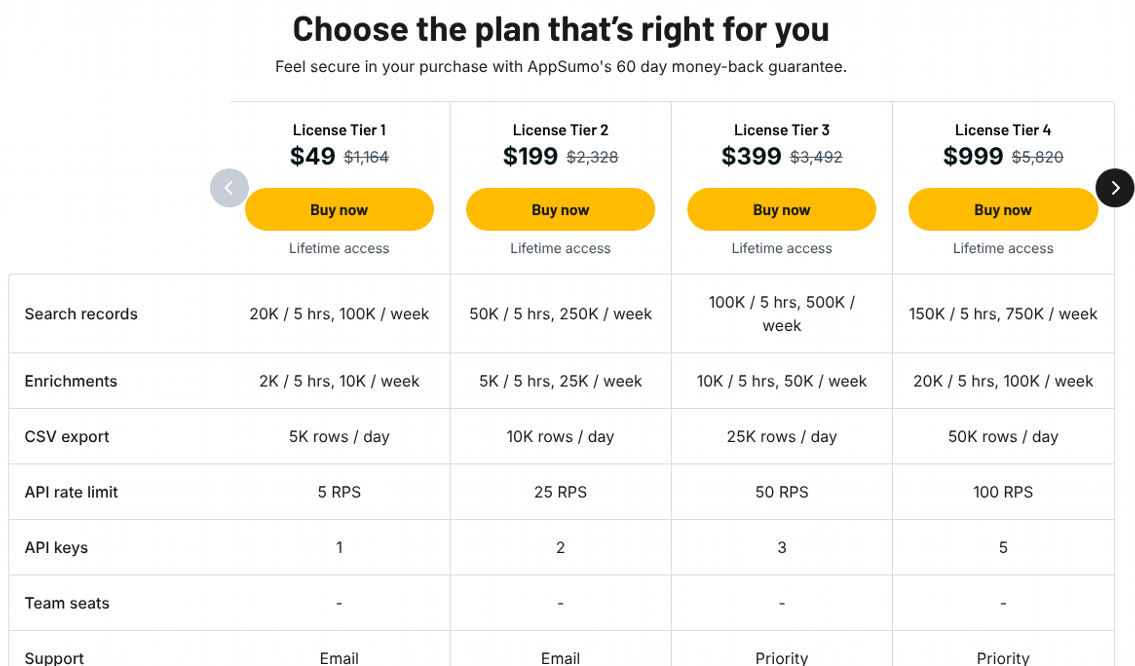
AppSumo tiers 1 to 4. Source: AppSumo LeadOcean deal page, 17 Nov 2026.
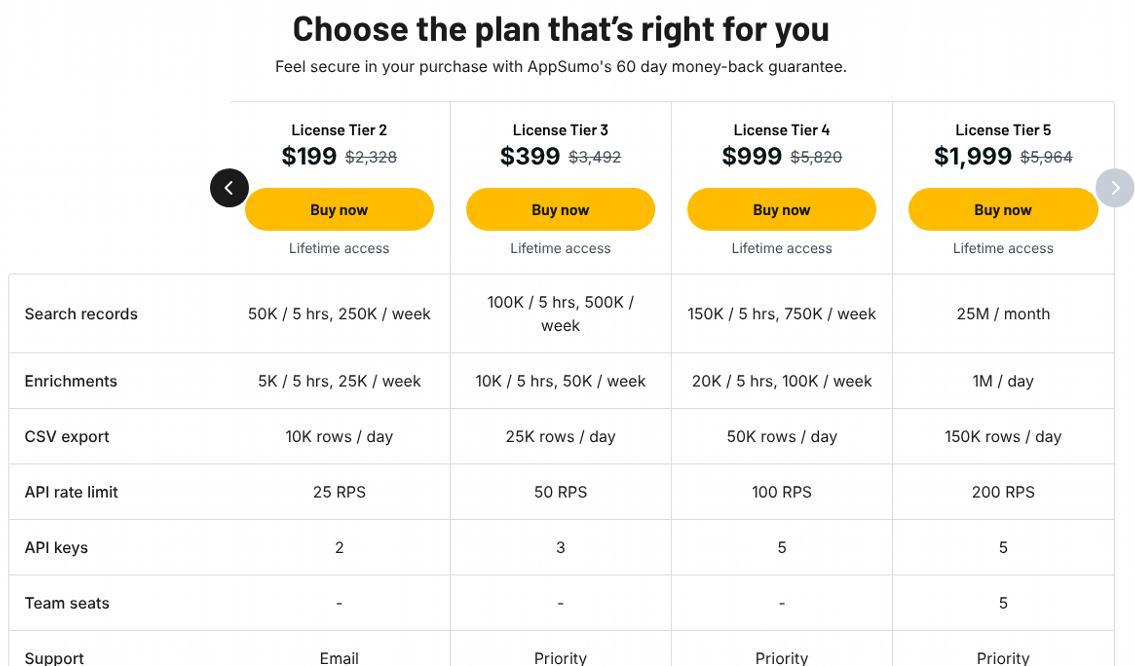
The same table moved one column to show Tier 5. Source: AppSumo LeadOcean deal page, 17 Nov 2026.
LeadOcean vs Apollo vs ZoomInfo
Here is the short version. For a full, job-by-job comparison including Lusha, read our LeadOcean vs Apollo comparison.
LeadOcean | Apollo | ZoomInfo | |
|---|---|---|---|
Pricing model | Flat price, no credits | Credits per seat | Annual contract with credits |
Entry price | Free; $97 a month; lifetime from $49 once | Free; $49 per seat a month, billed annually | Not published |
Phone numbers | Included | Use credits | Included in plans |
Sequences and dialer | No | Yes | Dialer yes |
Chrome extension | No | Yes | Yes |
Intent data | No | Yes | Yes (Copilot Advanced) |
Lifetime deal | Yes, on AppSumo | No | No |
The pattern is clear. Apollo and ZoomInfo are full sales platforms with data inside. LeadOcean is just the data, at a flat price, built to feed whatever stack you already use.
Pros and cons
Pros
- No per-credit costs, so large lists don’t punish you.
- Phone numbers included, with no per-reveal charge.
- Free counts and market sizing before you spend.
- Clear email statuses that don’t overstate verification.
- MCP server on every plan, for Claude, ChatGPT and Cursor.
- CSV exports of up to 50,000 rows per file on monthly plans.
- Monthly plans you can cancel, plus a lifetime deal with a 60-day refund.
- In our test, 1,380 sales leaders in one niche had a mailable address, and 4 of the 5 people we looked up had a phone number.
Cons
- No outreach tools, dialer or Chrome extension.
- No intent data or org charts.
- No published email or phone accuracy figure.
- A small team of 1 to 10 people, which matters for a lifetime deal.
- AppSumo tiers 1 to 4 have no team seats.
- In our test, only 2 of 5 full lookups had a ready-to-send work email at the person’s current company.
LeadOcean FAQs
Is LeadOcean really unlimited?
It is unlimited in volume over time, but not in speed. Each plan has a pace, such as a number of records every 5 hours and every week. When you reach it, you slow down until the window refills. You are never cut off and never charged extra.
What counts as a record in LeadOcean?
One person or one company you receive is one record. A search page of 25 people counts as 25. Counts, breakdowns, empty searches and enrichments with no match are free.
Does LeadOcean have phone numbers?
Yes. LeadOcean says 190 million people in its database have a phone number, returned as mobile, direct or office numbers. Phones are included on every plan with no per-reveal charge. The AppSumo tiers include a monthly phone reveal allowance, from 100 to 15,000.
Can I use LeadOcean inside Claude or ChatGPT?
Yes. Add LeadOcean’s hosted MCP server to Claude, ChatGPT, Cursor or another MCP client, sign in, and ask for leads in plain English. It is included on every plan and every AppSumo tier.
Does LeadOcean integrate with HubSpot or Salesforce?
Yes, through the API, Zapier, Make, n8n or LeadOcean’s recipes. There is no native app inside those CRMs, so the connection runs through an automation or your own code.
Is there a free plan?
Yes. The free plan gives you 1,000 records, once, with no card needed.
Is the LeadOcean AppSumo deal refundable?
Yes. AppSumo offers a 60-day money-back guarantee, and you must activate your licence within 60 days of purchase.
Final verdict: is LeadOcean worth it?
LeadOcean is at its best as a high-volume data source for building lists and enriching records. If your current bill is driven by credits, its flat pricing changes the maths completely, especially for agencies and anyone feeding data into AI workflows through MCP.
It is not a full sales platform, and it doesn’t pretend to be. Pair it with a sending tool like ReachHQ, Instantly or Smartlead, and keep your CRM. If you need intent data, a dialer and sequences in one place, Apollo or ZoomInfo will fit better.
For most readers, the lifetime deal is the easy way in. Start with Tier 1 to test it on a real project. Agencies should look at Tier 2 or 3, and teams that need several seats should look at Tier 5. With a 60-day refund window, the risk is low.
Our rating: 8/10. In our test, LeadOcean found a large audience for free, returned phone numbers for most people and charged nothing beyond the deal price. It loses points because only some current-job emails were ready to send, and because it has no outreach tools. If data in bulk is your biggest cost, the lifetime deal is worth it.
Get the LeadOcean lifetime deal on AppSumo
Try LeadOcean free, with 1,000 records and no card needed.
