






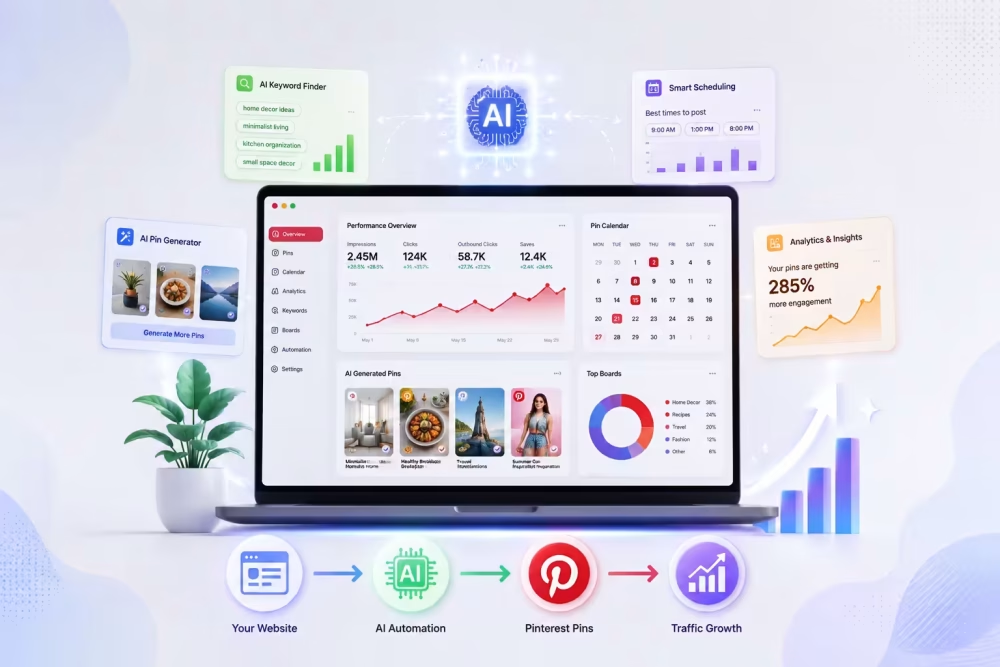
PinBoostr is an AI Pinterest automation tool built for bloggers, sellers, and affiliate marketers. You connect your Pinterest account and your website. The AI then studies your pages, writes keyword-rich titles and descriptions, designs on-brand pins, and matches each pin to the right board. Pins publish on a schedule through the official Pinterest API.
The tool tracks impressions, saves, and link clicks in one dashboard. It also runs an Account Health system that warns you before your reach drops. The company says 2,400+ creators use it. You stay in control with review-before-publish. Let’s Explore PinBoostr Lifetime Deal review.
PinBoostr Pros And Cons
Pros
- Official Pinterest API keeps your account safe from bans
- AI builds pins, titles, and descriptions from a single URL
- Account Health warnings catch reach drops before real damage
- Bulk CSV import turns old blog archives into months of pins
- One-time payment beats years of monthly scheduler fees
Cons
- Useless for niches with no Pinterest audience, like B2B software or local services
PinBoostr AppSumo Pricing
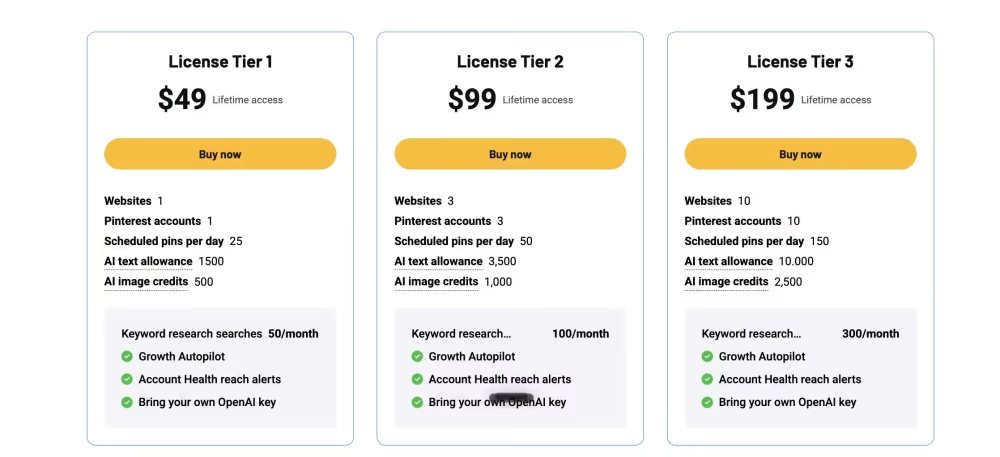
AppSumo lifetime deals usually start near $49 for a single-site license. Higher tiers add more websites, more monthly pins, and more connected Pinterest accounts. You pay once and keep access. AppSumo includes a 60-day refund window, so you can test the tool with a real account and walk away if results disappoint. Stacking codes raises your limits later. Lifetime pricing suits Pinterest work well, since traffic builds slowly across six to twelve months. A monthly bill during that quiet period feels painful. One payment removes that pressure completely. Always confirm exact tier limits before buying.
10 Key Features And Capabilities
01. AI Pin Generation From Any URL
Drop a link. Get pins. That’s the whole flow. The AI Designer reads your blog post or product page and pulls out the main idea. Then it builds several pin designs from that single URL. Not one pin. Multiple fresh variations, so your feed never looks repetitive.
I couldn’t help but notice how much time this saves. Designing five pins in Canva takes me about 40 minutes. Here it takes seconds. The AI learns your brand colors, fonts, and voice first. So the output actually looks like your site, not some generic template pack.
The pins arrive as editable drafts. You can change the title, swap the link, or delete the ones you dislike. Nothing goes live without your approval if you keep review mode on. That matters for people who care about brand quality.
For bloggers sitting on 200 old posts, this feature alone turns a dead archive into months of Pinterest content.
02. Smart Scheduling Engine
Posting at random times wastes good pins. PinBoostr picks your best-performing hours and spreads pins across them. The engine keeps a steady queue, so you never dump 20 pins at once and trigger spam flags.
Speaking of which, pacing is where most cheap schedulers fail. They just fire pins on a fixed clock. This one adjusts based on what your account can handle. It uses per-URL, per-board, and per-keyword caps. New accounts get a warm-up period instead of full-speed posting on day one.
You can preview the next two weeks of scheduled pins before anything publishes. So you see exactly what’s coming. No surprises on a Monday morning.
To be honest, this is the part I’d want most from any Pinterest tool. Consistency beats volume on Pinterest. A tool that posts a little every day, forever, will beat a human who posts 50 pins then quits for a month.
03. Official Pinterest API Publishing
This one is not flashy, but it protects your account. The tool connects through Pinterest OAuth. It never stores your password. It does not scrape Pinterest. It does not run browser automation in the background.
Why does that matter? Because tools using unofficial methods get accounts suspended. I’ve read too many horror stories from bloggers who lost a 500,000-monthly-viewer account overnight. Rebuilding that takes years.
API publishing also means your pins count as native Pinterest posts. The platform sees them as normal activity from an approved app. No red flags. The site lists itself as Pinterest approved.
As far as I know, most serious tools now use the API. But some budget options still do not. Worth checking before you trust any tool with your main account. This box is ticked here, which removes a big worry.
04. On-Brand Design Templates
PinBoostr studies your website and builds matching pin design styles. Your fonts. Your colors. Your general look. So the pins feel like an extension of your site instead of stock graphics.
You also get a simple template editor. Build reusable templates from scratch or start with the built-in ones. Then the AI fills them with new content automatically. Set it up once, reuse it forever.
Another way to use this: pick a few pins from any of your boards, and the tool generates fresh images that match their exact look. Great for repeating a style that already works.
If you ask me, brand consistency is underrated on Pinterest. People start recognizing your pins in the feed. That recognition drives clicks over time. Manual designers usually drift off-brand after 50 pins. AI templates do not drift. Every pin stays inside your rules.
05. Keyword-Rich Pin Titles
Pinterest works like a search engine. Titles decide whether your pin shows up at all. PinBoostr writes titles packed with the terms people actually type into Pinterest search.
The AI reads your page content first, then matches it against real search terms. So the title stays honest to the content while still hitting keywords. No keyword stuffing that reads like garbage.
Come to think of it, this is where most bloggers lose. They write cute titles like “My Favorite Fall Soup.” Nobody searches that. A tool that writes “Easy Pumpkin Soup Recipe For Fall Dinners” will pull traffic that cute titles never touch.
Every title arrives editable. You can tweak the wording, add your brand name, or rewrite it completely. The AI gives you a strong starting point instead of a blank box. For non-native English writers, that starting point is worth a lot.
06. SEO-Optimized Descriptions
Descriptions feed the Pinterest algorithm more context. PinBoostr writes them for you, using intent and trend signals from its keyword research engine.
Each description gets built around the page it points to. So a recipe pin talks about ingredients and cook time. A product pin talks about the item and who it suits. The AI does not paste the same generic paragraph across 100 pins.
Writing 30 unique descriptions per week by hand is brutal work. I’ve done it. By the third one your brain switches off, and quality drops hard. Automation handles this better than a tired human.
Let’s face it, descriptions are the boring part of Pinterest. Nobody enjoys writing them. Handing that job to AI frees you to work on actual content. And since drafts stay editable, you keep final say on wording that matters.
07. Growth Brain Autopilot
Growth Brain is the decision engine. Flip on Autopilot and it scores your website content, picks your best pages, decides what to pin, chooses the timing, and matches the board. It keeps a healthy queue full without you touching anything.
Most Pinterest tools wait for you to design and queue every pin. This one decides for you. That’s the core difference the company points to in its comparison table.
Growth Brain also learns from results. It reads your analytics, spots winning pins and URLs, then doubles down on what works. So the system gets smarter each month instead of repeating the same guesses.
Guess what, you still keep control. Review-before-publish stays optional but available. Agencies can leave it on and approve client pins weekly. Solo bloggers can turn it off and let the thing run alone. Both setups work from the same dashboard.
08. Account Health Monitoring
This is the feature the company calls its exclusive edge. Pinterest quietly throttles accounts. Your impressions collapse, and most tools say nothing at all.
PinBoostr checks your reach every day. When a drop starts, it flags it right away. Then it explains the likely reason in plain language and tells you what to fix. And here’s the smart part: it automatically eases off posting so your account can recover.
I hate to say this, but plenty of bloggers keep blasting pins into a throttled account for months. They wonder why nothing works. A tool that pumps the brakes for you prevents real damage.
The way I see it, this feature justifies the whole product for anyone with an established account. Growth tools are everywhere. Protection tools are rare. Losing a mature Pinterest account costs far more than any subscription fee.
09. Traffic Analytics Dashboard
Real Pinterest metrics land in one clean view. Impressions, saves, link clicks, and trends over time. No jumping between Pinterest Analytics and Google Analytics.
The dashboard ranks your top pins, boards, and URLs. So you see which content pulls traffic and which content flops. That data tells you what to write next, which is honestly more useful than the pin scheduling itself.
You also get a weekly performance email. It lands in your inbox with the numbers, so you do
not need to log in every day just to check progress.
Correct me if I’m mistaken, but tracking is where most bloggers guess. They post pins and hope. Numbers remove the guessing. Once you spot a pin format that pulls 300 clicks, you copy that format 20 more times. That single habit grows accounts faster than any AI feature.
The reports also feed Growth Brain. So your data does not just sit there looking pretty. It shapes the next batch of pins automatically.
10. Multi-Site Support And Bulk CSV Import
One account handles several websites. Connect each site, keep separate brand styles, separate boards, and separate queues. No logging in and out between projects.
That setup suits agencies and people running three or four niche blogs. Each site keeps its own look. Reports stay separate too, so you know which project earns its keep.
Bulk CSV import covers the other side. Upload a spreadsheet of URLs, and PinBoostr builds pins for every row. Got 300 old blog posts? One upload turns your archive into a full content pipeline.
Read More: Posteahora Review | Best Social Media Tool
Just between you and me, this is how smart bloggers use these tools. They stop chasing new content and start recycling old posts that already rank. A 2021 article can pull fresh Pinterest traffic in 2026. The CSV import makes that job take minutes instead of weeks.
Pinterest rewards people who show up every single day. Most bloggers cannot keep that pace by hand. That gap is exactly where this tool earns its place. The strong parts are clear. Official API publishing protects your account. AI handles pin design, titles, and descriptions from one link. Account Health warnings catch reach drops early, which few tools even try.
Bulk CSV import wakes up your old posts. And one payment beats years of monthly bills. The weak part is simple too. No Pinterest audience means no results. B2B software, dev tools, and local services should skip this. My take? Buy it if you run a visual blog, an Etsy shop, or affiliate content in food, travel, home, fashion, or fitness. You need at least 30 published pages to feed it. Grab the AppSumo tier that matches your site count, test it for 60 days, and judge the click numbers yourself.