












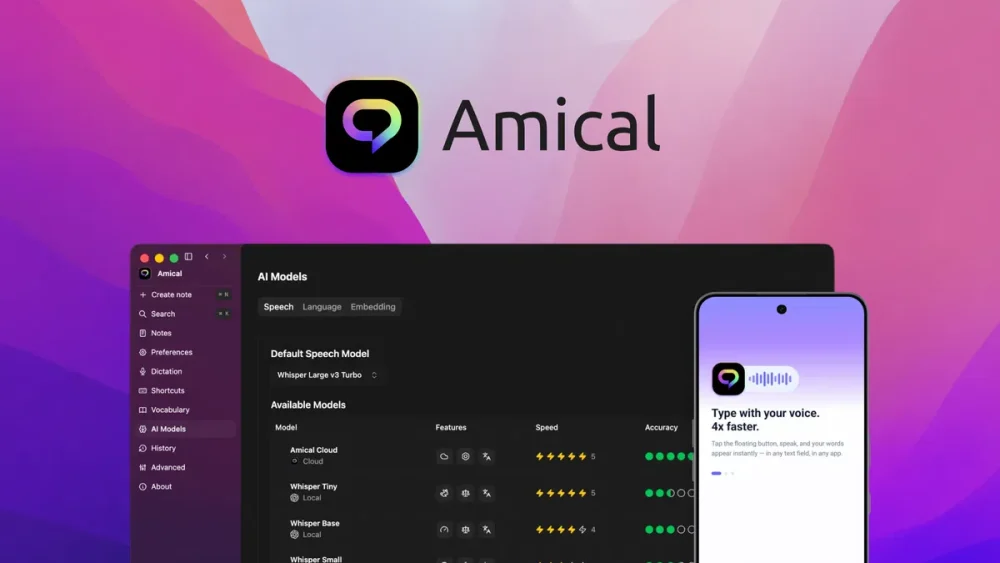
Amical is an open-source speech-to-text app. It uses AI to convert spoken words into written text fast. Amical works on Mac, Windows, iOS, and Android, so you dictate from any device. The tool formats your text based on where you type, like email or chat apps. Amical supports both local AI models and cloud AI models. This gives you a choice between speed and privacy. Amical also handles over 100 languages, even mixed in one session. This makes Amical a solid pick for people who talk faster than they type.
Freelancers, content creators, sales teams, and coders who type a lot each day gain the most from Amical. Redoan, given your daily reel production and client outreach work, Amical could speed up scripting, email replies, and note-taking across your tools. Privacy-minded users and multilingual professionals also find strong value here.
Amical Review : Voice-to-Text AI Tool Review
Monthly Pricing On Amical’s Website
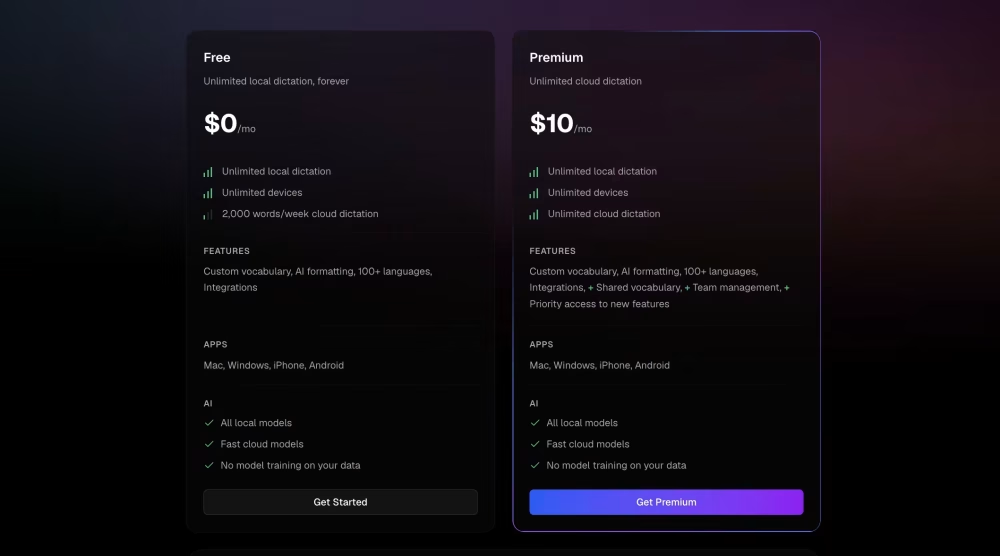
Amical’s own site lists a free plan at $0. Free users get unlimited local dictation plus a weekly cloud word cap around 2,000 to 8,000 words, depending on the source checked. Premium costs $7 per month if billed yearly, or $10 per month if billed monthly. Premium removes cloud limits and adds full features.
Amical AppSumo Lifetime Deal:
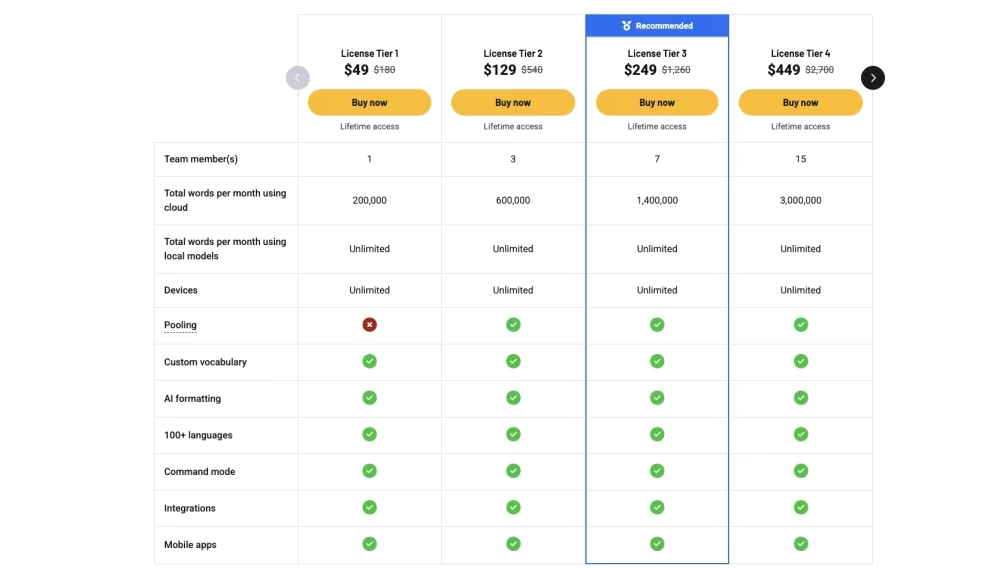
Amical’s AppSumo deal runs across five tiers. Tier 1 starts at $49 and gives one team member 200,000 cloud words per month, plus unlimited local dictation. Higher tiers scale up to $649 for larger teams with more seats. Every tier includes lifetime access, so you pay once and skip monthly fees. AppSumo backs this with a standard 60-day refund window. This makes Amical cheap next to yearly subscription costs from rival apps.
Amical Pros And Cons:
Pros
- Amical works across almost any app with one hotkey
- Local AI mode keeps voice data private and off the cloud
- Amical supports over 100 languages with mid-session switching
- Open-source code builds trust for privacy-focused users
Cons
- iOS support still sits in TestFlight beta, so it is not fully ready
10 Key Features Of Amical
01: Instant Speech-to-Text Conversion
Amical turns your spoken words into text right away. You speak, and the words show up on screen in seconds. This saves time compared to typing. Amical was built with its own AI engine over almost a year of work. This engine keeps up with fast talkers. You do not wait for slow processing. The output stays close to real-time. This helps during calls, meetings, or quick notes. Amical also cleans up filler words as you speak. The text comes out ready to use, not a rough draft. Many users praise this speed as the top reason they picked Amical. Speed matters for busy people who juggle many tasks. Amical fits into fast workflows without friction. You save minutes every day, which adds up over weeks. This feature alone can replace slow manual typing for many daily tasks.
02: Local AI vs. Cloud AI Options
Amical gives you two paths for AI processing: local and cloud. Local AI runs Whisper models directly on your device. This keeps your voice data private and off the internet. No audio leaves your machine with local mode. Cloud AI processes on Amical’s servers instead, often with better speed for large tasks. You get unlimited local dictation words on every tier. Cloud words have limits based on your plan tier. This split lets users pick based on need. Privacy-focused users lean on local mode. Speed-focused users may prefer cloud mode for tough audio. Amical does not force one choice on you. You switch between them as needed. This flexibility sets Amical apart from many single-mode dictation tools on the market today.
03: Works Across Any App
Amical works at the system level, not just inside one app. You can dictate into Gmail, Slack, Notion, Google Docs, or even a terminal window. Press your hotkey, speak, and the text lands where your cursor sits. No copy and paste steps needed. No app switching required either. This is different from tools locked into a single platform or browser extension. Amical acts like a universal typing replacement. This matters for people who work across many tools each day. Sales reps, writers, and coders all benefit from this reach. You do not need separate dictation setups for each app you use. Amical becomes one tool for all your writing tasks. This cross-app reach saves setup time and reduces tool clutter on your desktop.
04: 100+ Language Support
Amical handles over 100 languages for dictation. You can even switch languages mid-session without manual toggling. This helps people who speak more than one language at work. Say you write in English then switch to Spanish in the same email. Amical picks up the change without extra steps. This is rare among dictation tools, which often lock users into one language per session. Global teams and freelancers with international clients gain real value here. Amical’s team built strong multilingual accuracy, and customers praised this support point often. This feature widens who can use Amical well beyond English-only markets. It also helps content creators make videos or posts for different regions. Wide language support turns Amical into a global tool, not just a local one.
05: Context-Aware Formatting
Amical formats your dictated text based on where you are typing. Text for Gmail looks different from text for Slack or Notion. Amical adjusts tone, spacing, and structure to fit the app. This saves you from manual cleanup after dictating. The feature works live as you test different apps. Some reviewers note this works well most times but still has room to grow. Still, this smart formatting cuts editing time compared to plain transcription tools. You get the text closer to the final form right away. This helps professionals who write in many app styles daily. Email needs a different structure than a chat message. Amical tries to match that automatically. This feature reduces the gap between speaking and publishing content across platforms.
06: Custom Vocabulary Training
Amical lets you teach it your own words. This includes brand names, jargon, and unique phrases you use often. Without this, dictation tools often misspell niche terms. Amical fixes that gap through training. You add your terms, and Amical remembers them going forward. This helps your output sound like your own voice, not a generic transcript. Businesses with specific product names benefit greatly here. Doctors, lawyers, and marketers all use special terms daily. Amical adapts to that language over time. This feature is available even on the free plan, according to billing details. Custom vocabulary means less manual correction after each dictation session. Your text stays accurate to your field and brand style. This saves real editing time each week for niche professionals.
07: Smart Grammar Autocorrect
Amical cleans up grammar as you speak. Spoken language often includes run-ons, filler words, and broken sentences. Amical smooths these out in the final text. You do not need to fix basic grammar errors by hand. This step happens automatically during the formatting stage. The result reads more like written text, not a raw transcript. This matters for professional emails and documents. Users want polished output, not a messy first draft. Amical’s grammar layer helps close that gap. This feature works alongside the context-aware formatting to produce clean, readable text. Together, these features cut editing work after each session. You spend less time proofing and more time doing other tasks. Grammar autocorrect adds real value for people who dictate long messages daily.
08: Built-In Meeting Recorder
Amical includes a recorder built for meetings. You can capture meeting audio and turn it into text without a separate app. This removes the need for extra recording software. One tool covers both dictation and meeting capture. This helps remote teams who need meeting notes fast. You get a written record without manual note-taking during calls. This can replace tools built only for meeting transcription. Teams save money by using one tool for two jobs. The recorder works within the same Amical interface you already use. This keeps your workflow simple and avoids app overload. Meeting notes become searchable text instead of long audio files sitting unused. This feature adds strong value for teams doing many calls each week.
09: Hands-Free Hotkey Activation
Amical starts dictation with a hotkey press. You do not touch your mouse or click through menus. Press the key, speak, and Amical listens right away. This keeps your hands on the keyboard during work. No app switching or window hunting needed. This small feature saves seconds each time, which adds up over a full day. Fast typists and coders like this quick access method. It fits into a natural work rhythm without breaking focus. The hotkey works across the apps Amical supports at the system level. This means one shortcut works everywhere, not a different one per app. Simple activation makes Amical feel less like separate software and more like a built-in typing tool on your machine.
10: Open-Source Codebase
Amical’s code sits on GitHub and stays free to use. This matters for privacy-focused users and developers who want to inspect the code. Open code means no hidden data collection you cannot check. Users worried about their voice data feeding AI training pipelines get more control here. Developers can also build on top of Amical or fix bugs themselves. This openness builds trust that closed, paid tools cannot always offer. Amical stands out among dictation apps because most competitors keep code private. This choice reflects a different business model, one built on transparency. Technical users and privacy advocates value this point highly. Open-source status also means the community can help improve Amical over time, not just the core team behind it.
Read More: Voicedash Review | Type Fast With Your Voice
Amical is an open-source voice-to-text app that turns spoken words into clean, formatted text in any app you use. It runs on Mac, Windows, iOS, and Android, so you dictate from any device you own. Amical gives you two AI choices: local models for privacy, or cloud models for speed. It supports over 100 languages and switches between them mid-sentence without extra setup. Amical formats your text based on where you type, matching email style for Gmail and chat style for Slack. The AppSumo lifetime deal starts at $49, which beats paying monthly for similar dictation tools.