














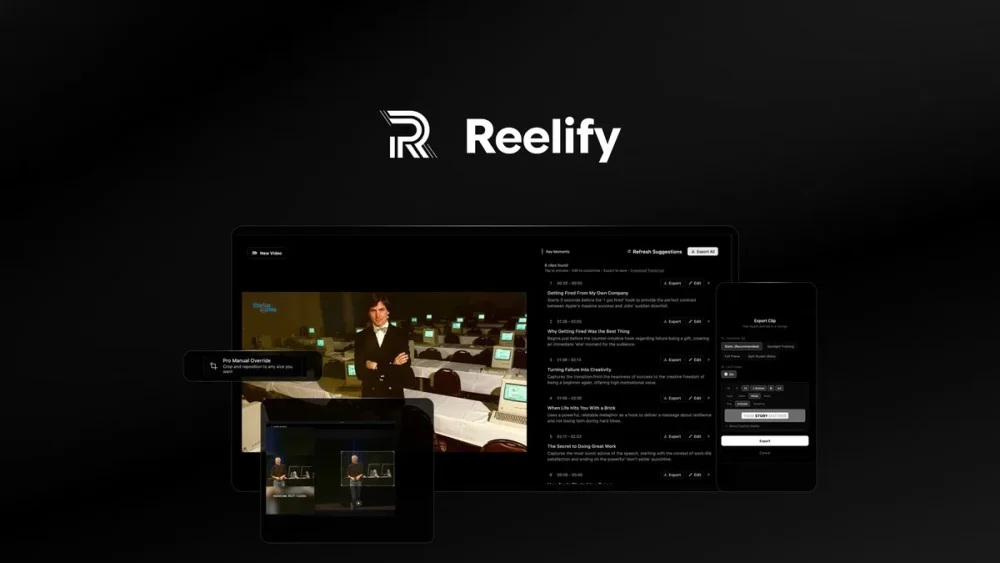
Reelify is an AI video clipper built for Mac users. It scans long recordings like podcasts and webinars, then finds the best moments. The tool runs on your device, so your footage stays private. It creates ten short clips from one long video in about 90 seconds. Reelify adds captions, crops the video, and exports it in vertical format for TikTok, Reels, and Shorts. This makes it a fast option for creators who post on social media daily.Lets explore Reelify Review.
AppSumo Lifetime Pricing
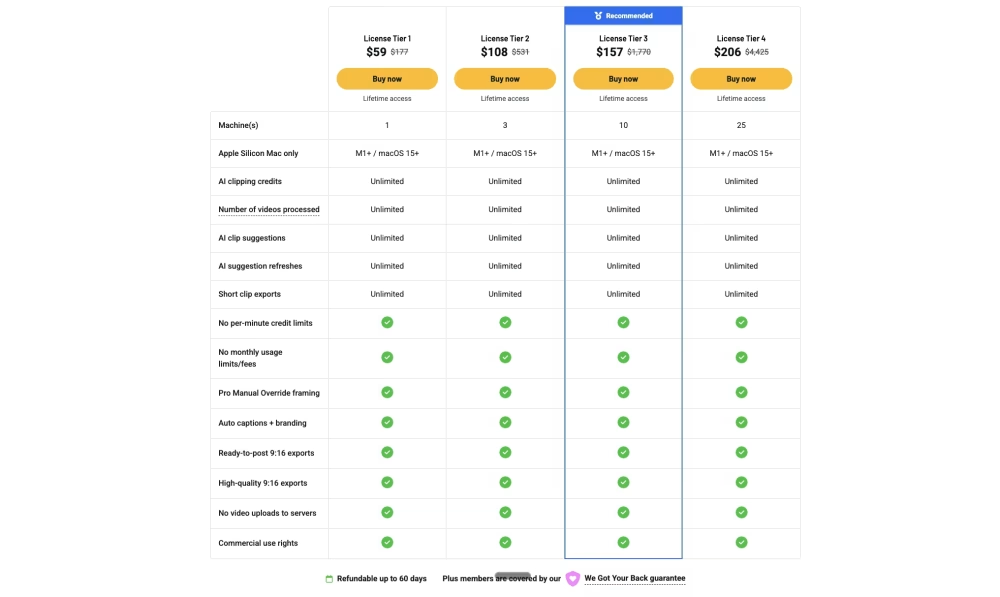
The AppSumo lifetime deal starts at $59 for one Mac license, down from a listed price of $177. Higher tiers cover more machines: $108 for three, $157 for ten, and $206 for twenty-five. Every tier includes unlimited AI clipping, unlimited exports, and no monthly fees. A 60-day money-back guarantee backs the purchase. This makes the deal simple to test without long-term risk.
Reelify Review: Turn Long Videos Into Unlimited Short Clips
Reelify Pros & Cons:
Pros
- Finds viral moments automatically.
- Runs fully on your Mac, no uploads.
- No credit or minute limits.
- Strong value as a lifetime deal.
- Supports direct YouTube links.
- Adds captions and vertical cropping.
Cons
- Only works on Apple Silicon Macs.
- Limits you to about ten clips per video run.
Reelify 10 Key Features
01: AI-Powered Moment Detection
Reelify scans your full video for hooks, emotional peaks, and quotable lines. It looks for moments where tone, pace, or energy shifts. This saves creators from rewatching hours of footage. The AI ranks each moment by its potential to perform well online. You get a list of clips sorted by strength, not random cuts. This feature works on podcasts, interviews, and talking-head videos. Creators using Opus Clip before say Reelify gives similar results at a lower price. The detection runs locally, so there is no wait time for cloud processing. Speed stays fast even with long files. This makes the tool practical for daily content creators who need clips fast.
02: 90-Second Full Video Analysis
A one-hour video takes about 90 seconds to analyze on Reelify. Cloud tools often take 15 minutes or more just to upload a file. Local processing skips that step entirely. Speed depends on your Mac’s chip, but Apple Silicon models handle this well. This means creators spend less time waiting and more time posting. A three-hour podcast still finishes in minutes, not hours. This speed comes from on-device AI, not server queues. For agencies handling client videos, this cuts turnaround time. Fast analysis also means you can test more raw footage without extra cost. Every video processed locally counts toward zero credits used.
03: 10 Viral-Ready Clips Per Upload
Each video upload gives you ten short clips, ready to review. You don’t pick timestamps by hand. The AI selects clips based on hook strength and emotional shifts in speech. Each clip includes a suggested title. This turns one long recording into a week’s worth of content. Podcasters can post daily from a single episode. Coaches can turn one webinar into ten LinkedIn or Instagram posts. The clip count stays fixed at ten per run, though you can refresh suggestions for new options. This structure removes guesswork from content planning. Creators no longer need to manually scrub footage for standout moments.
04: Drag-and-Drop Video Import
You add a video by dragging the file into the app window. No account setup steps get in the way. This keeps the process simple for non-technical users. Files stay on your Mac the entire time. There’s no waiting for an upload bar to finish. This matters for large 4K files that take time to move over the internet elsewhere. Drag-and-drop support also means less friction when switching between projects. Editors managing multiple client files can move fast between imports. The simple interface fits users who don’t want a steep learning curve. This is one reason reviewers call the app beginner-friendly.
05: YouTube Link Paste Support
Reelify lets you paste a YouTube link instead of downloading the file first. This saves a manual export-import step. Creators repurposing old YouTube content can start clipping right away. This works well for creators who already publish long-form videos on YouTube and want short versions for TikTok or Reels. It cuts out extra software just to grab a video file. This feature suits agencies managing several client channels. Speed stays the same as local file imports once the video loads. This small feature removes a common workflow headache for repurposing teams. It’s a practical shortcut, not a major function, but it saves real time weekly.
06: Automatic Emotional Peak Detection
The AI tracks shifts in voice pitch, speaking speed, and tone to catch emotional peaks. When someone gets excited or surprised, the tool flags that section. This helps find natural hooks without watching the whole clip. Emotional variance is one part of what makes content shareable. This detection method goes beyond loud noise or volume spikes. It reads pattern shifts across the whole video, not just isolated seconds. For interview shows, this catches genuine reactions that make good clips. Fitness creators can catch big moments in workout demos this way too. This feature forms the core of what makes Reelify different from basic editing software.
07: Smart Highlight Extraction Engine
This engine pulls the strongest segments from a video and ranks them by viral potential. It checks for a hook, a clear point, and a strong ending. Weak segments get filtered out automatically. This saves the guesswork that comes with manual editing. Streamers can find clutch gaming moments from long VODs without scrubbing footage. The engine also checks if a clip stands alone without needing extra context. This matters for social platforms where viewers skip unclear content fast. The extraction process runs the same way across podcasts, webinars, and interviews. This consistency helps creators trust the output without manual review every time.
08: Instant Clip Preview Before Export
You can preview each clip before saving it to your device. This lets you check framing, timing, and captions first. No wasted exports on clips you don’t want. The preview window shows the vertical 9:16 format used for TikTok, Reels, and Shorts. You adjust the crop or timing right in this view. This step gives control back to the creator after AI does the heavy lifting. Editors can approve or reject clips quickly during client reviews. This feature bridges the gap between full automation and manual editing. It keeps quality checks simple before content goes live on any platform.
09: On-Device Neural Engine Processing
Reelify uses the Neural Engine built into Apple M-series chips to run AI tasks locally. This chip handles the heavy computing work without sending data elsewhere. Intel Macs don’t support this feature since they lack the same hardware. This setup makes the app faster than most cloud-based tools. It also means no internet connection is needed once the app opens a file. Privacy comes as a direct result of this local setup, not just a policy choice. For agencies handling sensitive client footage, this matters a lot. This hardware requirement is the main limitation to check before buying.
10: Zero Video Upload Requirement
Your video files never leave your Mac during the clipping process. This means no upload wait time and no server storage of your footage. Privacy stays strong since no third party ever sees your raw content. This differs from most competing tools that need cloud uploads to work. Creators handling private client interviews benefit most from this setup. There’s also no risk of a slow internet connection stalling your work. This local-first design shapes almost every other feature in the app. It’s the core reason Reelify can offer unlimited clipping without credit limits.
Read More: Amical Review : Voice-to-Text AI Tool Review
Reelify gives Mac creators a fast, private way to turn long videos into short clips without monthly limits. The tool fits podcasters, coaches, and agencies who post often on TikTok, Reels, or Shorts. Intel and Windows users should skip this deal since the app needs Apple Silicon to run. For Mac-based creators tired of slow cloud tools, the lifetime price makes this a solid pick to test with the free plan first.