







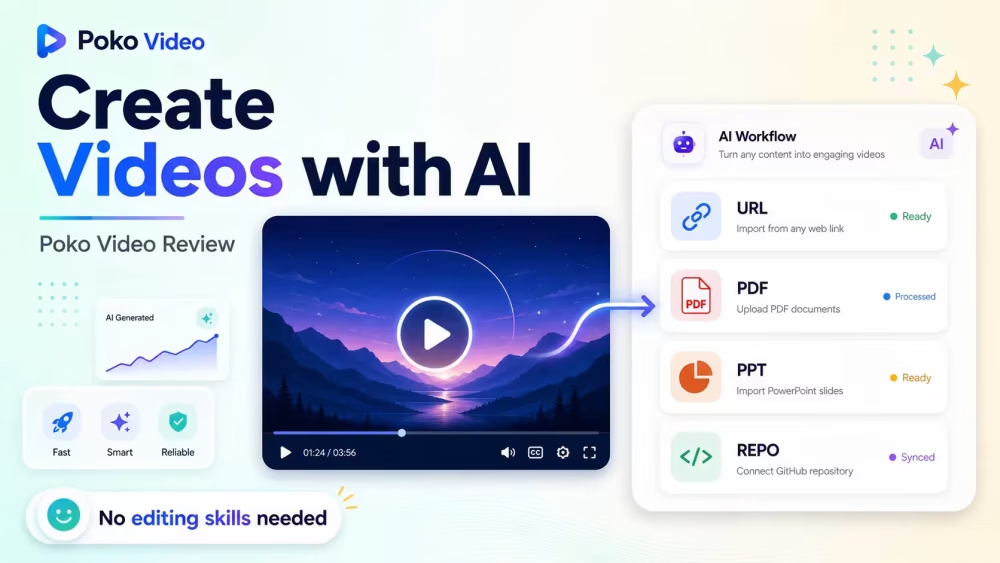
Ever waited hours for a cloud video render? Last week, I tested a tool that skips that pain. Poko Video runs the whole job on your own computer. No queues. No upload waits. Just fast results.
Let me share with you what makes this tool worth a look. Poko Video turns your files into motion videos. You feed it a repo, a website link, a PDF, or a PowerPoint deck. The AI reads your content, grabs your brand colors, and builds scenes. You watch the preview update live. When done, an MP4 lands in your Downloads folder. Simple as that.
To be honest, this is a fresh way to make videos. Speaking of which, let’s break it down.
Poko Video is a local AI video maker. It runs on your Mac or PC. You give it source material like a code repo, a website URL, a PDF file, or a PPT deck. The AI agent scans your content. It pulls out your brand fonts and colors. Then it writes a script and builds scenes with motion and transitions. You can chat with the tool to tweak things. Say “make it faster” or “change the colors.” Hit render, and your MP4 saves right to your machine. No cloud wait.
Poko Video Review | Turn Any Website or PDF Into AI Videos:
Poko Video Pros & Cons:
Pros:
- Local GPU rendering finishes videos in under 60 seconds on M-series Macs
- Your source files stay on your machine, so client data stays safe
- The AI writes scripts and builds scenes without manual work
- Brand fonts and colors get picked up from your source files
- BYOK support lets you cut AI costs with your own API key
- Live preview means no waiting to see if the video looks right
Cons:
- Older computers may struggle with fast render speeds
- New users need time to learn the chat-based edit style
Poko Video Monthly Pricing:
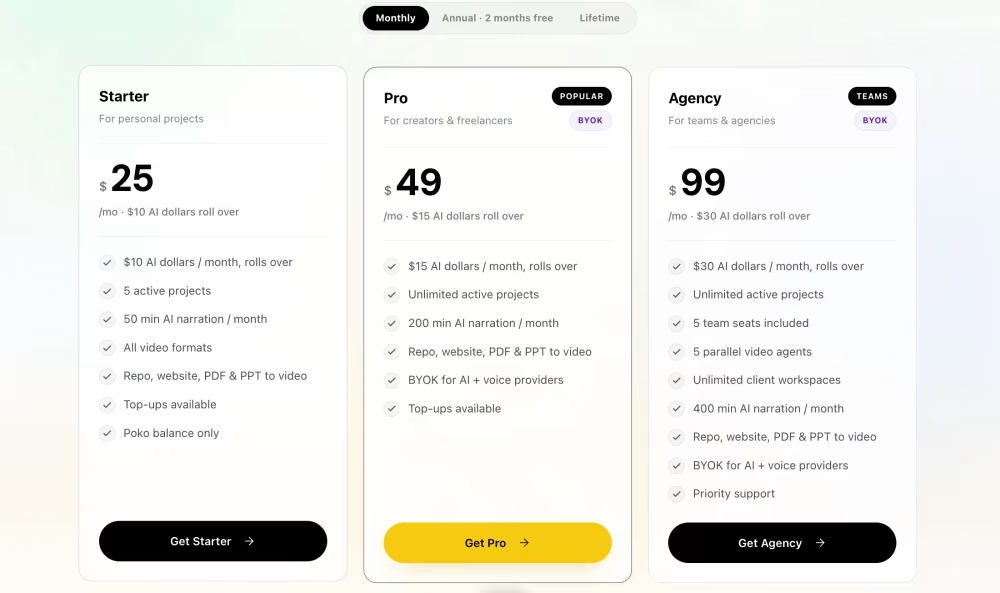
Poko Video offers three monthly plans. Starter costs $25 per month. You get $10 in AI dollars that roll over, 5 active projects, and 50 minutes of AI narration. All video formats work here. Repo, website, PDF, and PPT inputs come included. Top-ups stay available, but you use Poko balance only.
Pro sits at $49 per month. This one is the popular pick. You get $15 in rollover AI dollars, unlimited projects, and 200 narration minutes. BYOK support for AI and voice providers starts here. That saves money at scale.
Agency runs $99 per month. It adds 5 team seats, 5 parallel video agents, unlimited client workspaces, and 400 narration minutes. Priority support comes with it. Annual billing gives you 2 months free. Use code LAUNCH10 for 10% off any plan.
10 Key Features of Poko Video:
01. Multi-Source Input
Here’s the thing about most video tools. They make you build scenes from scratch. Poko Video works differently. You can drop in four types of source files. A project code repo. A live website URL. A PDF document like a pitch deck or whitepaper. Or a PowerPoint .pptx file. The AI agent reads each source type in its own smart way. For a repo, it scans your assets and brand files. For a website, it captures the page and pulls the visual style. For a PDF, it reads every page and writes narration. For a PPT, it keeps your slide layout but adds cinematic motion. This wide input range saves you time. You use what you already have. No need to start over from zero.
02. AI Brand Detection
Speaking of which, brand match is a pain in most tools. You hunt for hex codes and fonts. Poko Video skips that step. The AI agent scans your source file. It pulls your brand colors right from the design. It grabs your fonts too. Your logo gets picked up if it lives in the source. All these bits go into the video build. Your final video looks like your brand from the first frame. No manual color pickers. No font uploads. Just automatic style match. This works well for agency work where each client needs their own look. As I said, the tool does the boring parts so you focus on the story. That being said, you can still tweak colors later with a chat command if you want a fresh look.
3. Auto Script Writing
Writing a video script takes hours. The AI agent in Poko Video handles this part for you. It reads your source content first. Then it picks the key points that matter most. It writes narration that fits the length and pace of a video. The script matches the tone of your source too. A whitepaper turns into a serious voiceover. A landing page becomes a punchy ad script. You do not need to write a word if you do not want to. The way I see it, this saves the most time for busy creators. If you know what I mean, script blocks are the reason many videos never get made. Poko Video removes that block. You can still edit the script through the chat if the AI misses a beat.
4. Auto Scene Creation
By the way, scenes are what make a video feel alive. Poko Video builds them for you. The AI agent breaks your content into logical scenes. Each scene gets its own layout. Text moves in with motion. Transitions link scenes together. Zoom effects add drama when needed. The AI picks the right mix based on your content type. A product demo gets close-up zooms. A pitch deck gets clean slide-style moves. You do not touch a timeline. You do not drag clips around. The tool just builds the flow. Come to think of it, this is like having a video editor built into the app. If a scene feels flat, you tell the chat to fix it. The scene updates in the preview. Fast changes without opening a complex editor.
5. Live Video Preview
Now that you mention it, most AI video tools make you wait to see the result. You submit a job. You wait. Then you see if it worked. Poko Video shows you a live preview as the agent builds. You watch scenes form in real time. Text pops in. Colors shift. Motion plays. If something looks off, you catch it right away. No wasted render time on a bad take. This live view runs while you work. You can pause, chat with the AI, and see changes right there. To be fair, this feature alone makes the tool feel more like a real editing app than a black box. The funny thing is, watching the AI build feels a bit like magic. Fast feedback means better final videos.
6. Chat-Based Editing
Let’s put it this way. Traditional video editors have hundreds of buttons. Poko Video uses chat. You type what you want. “Make scene 2 zoom in slower.” “Swap to a dark background.” “Add the logo in the corner.” The AI reads your ask and makes the change. The preview updates on screen. You see the fix. If you like it, keep it. If not, ask for another change. This chat flow feels natural. No menu hunting. No tutorial videos to watch. You just say what you want in plain words. Just between you and me, this cuts the learning curve to near zero. New users can make good videos on day one. Chat edits work for style, pace, layout, and text. The AI understands most video terms right out of the box.
7. Local GPU Rendering
Here’s the thing that sets Poko Video apart. Rendering happens on your machine. Not in a cloud. M-series Macs render a 30-second video in under 60 seconds. That is fast. No wait for a cloud VM to spin up. No render queue behind other users. No per-render fees. Your GPU does the work. Your file stays on your disk. This means big savings on time and money. For agencies, this is huge. You can render dozens of client videos in a day without cloud costs adding up. The funny thing is, most tools charge you extra for faster renders. Poko Video gives you speed based on your own hardware. Better computer means faster render. Simple. If you already have a good Mac or PC, you get pro-level speed at no extra cost.
8. No Cloud Uploads
Speaking of local work, your source files never leave your machine. Poko Video only sends what the AI model needs to think. That means prompt text and file excerpts. The full file stays with you. Rendered videos stay local too. Only LLM tokens travel over the network. This matters for privacy. If you work with client data, NDAs, or private code repos, you can breathe easy. Prompt bodies are not saved on the server side. Only billing metrics like token count get kept. To be honest, this is a big deal for teams that handle sensitive work. If you ask me, most video tools ignore this issue. Your files sit on some cloud server for weeks. Poko Video takes the opposite path. Your files. Your machine. Your rules. Peace of mind built in.
9. Bring Your Own AI Key
Correct me if I’m wrong, but AI costs can pile up fast. Poko Video lets you plug in your own API key. If you have a paid OpenAI account, Anthropic Claude, or another supported provider, you use it. The proxy gets bypassed for these providers. That means you pay the raw model rate. No middleman markup. This is a big cost saver for heavy users. Agencies that make videos daily can save a lot each month. BYOK starts on the Plus lifetime plan. Claude and ChatGPT subscription connections work on Pro and Agency plans. That being said, if you do not want to manage a key, the included AI dollars work fine. You get flexibility either way. Beginners use the built-in credits. Power users switch to their own key when they scale up.
10. AI Voice Narration
Video needs a voice. Poko Video builds narration for you. The AI writes the script, then a voice model reads it aloud. You get narration minutes based on your plan. The starter plan includes 50 minutes per month. The creator plan gets 200 minutes. The team plan includes 400 minutes. That covers a lot of videos. The voice quality sounds clean and natural. It fits well for product demos, explainer videos, and pitch decks. The funny thing is, hiring a voice actor costs hundreds per video. Poko Video builds it in. On the other hand, if you want a specific voice style, BYOK lets you connect other voice providers too. Fair use limits apply, but for most creators, the included minutes are more than enough. Voice-over adds pro polish without the pro price tag.
Poko Video takes a different path than most AI video tools. It runs on your machine, not a server farm. That means fast renders, private files, and no queue waits. The chat editing feels natural once you get used to it. Auto scripts and scene builds save real hours each week.
FAQ
What input formats are supported?
The system supports six input types: project repositories (code, images, assets), website URLs, PDFs (pitch decks or docs), PowerPoint files (.pptx with preserved layouts), research papers (converted into short explainers), and prompt-based animation creation. More formats are coming soon.
Do I need to install anything besides the app?
No. Everything is bundled within the app, including Node.js, FFmpeg, the rendering engine, and a headless browser. No extra setup or terminal use is required.
Which AI model is used?
Claude Sonnet is the default across all plans, offering high-quality output and cost efficiency. Advanced plans also allow you to bring your own API keys, though non-Claude/GPT models are still experimental.
How are AI dollars billed?
AI usage is billed at actual provider rates. Plans include initial credits, and you can top up as needed. Higher-tier plans allow BYOK (Bring Your Own Key) for AI and voice models. Sound effects and music are billed separately via the platform balance.
How much does one video typically cost?
Most first edits cost around $1–$3 using Claude Sonnet, depending on project complexity. Additional edits are usually cheaper, while premium models may increase costs.
Read More: Reelify Review: Turn Long Videos Into Unlimited Short Clips
The lifetime deal makes sense for agencies, marketers, and solo makers who publish videos often. You skip monthly fees and cloud render costs. If you own a decent Mac or PC, you get pro speed for free.
Not a perfect fit for everyone, though. Older machines will feel slow. Beginners may need a few days with the chat commands.
Still worth grabbing at lifetime pricing. Try it, test a few videos, and see if the local approach suits your workflow. The refund window gives you room to decide.