










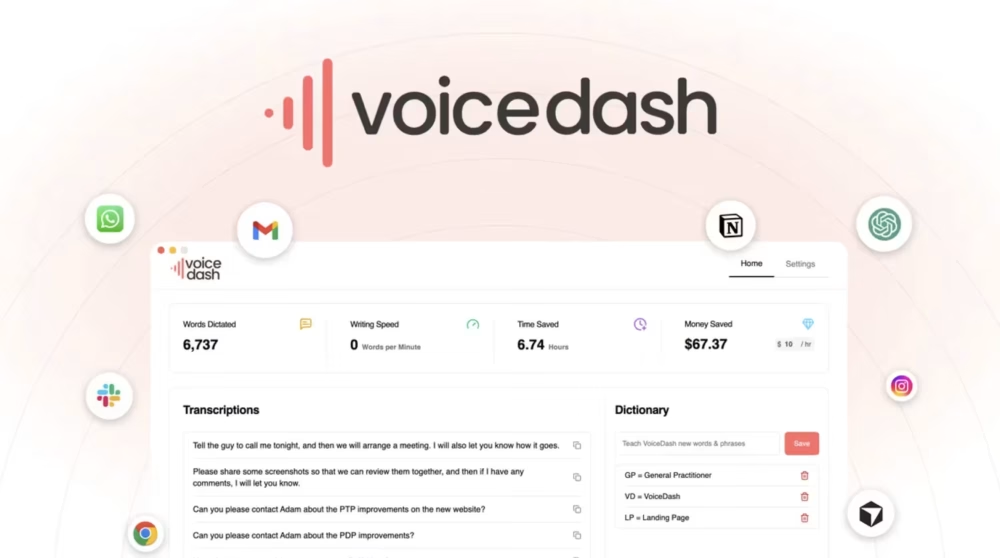
Voicedash turns your everyday speech into clear, polished writing across apps. You press a simple shortcut, start talking, and watch text appear instantly. The tool cleans filler words, fixes grammar, and adds punctuation as you speak. It works on Mac and Windows, with mobile support on the way. Voicedash helps creators, founders, and students write faster with less effort. At the end of the day, it feels like a smart typist in every app. Let’s Explore voicedash Review.
Voicedash Review | Type Fast With Your Voice:
Voicedash Pros & Cons:
✅ Pros
- Works across every app (Gmail, Slack, Notion, Word, CRMs, etc.)
- AI-powered clean output — fixes grammar, punctuation, and structure automatically
- Removes filler words like “um” and “uh” in real time
- Write up to 3× faster than typing
- Supports 38 languages with real-time translation
- Privacy-first — voice data is never stored or used for AI training
❌ Cons
- Can cut off the first word of a sentence and struggles with short phrases or single-word commands
Voicedash Review Pricing:
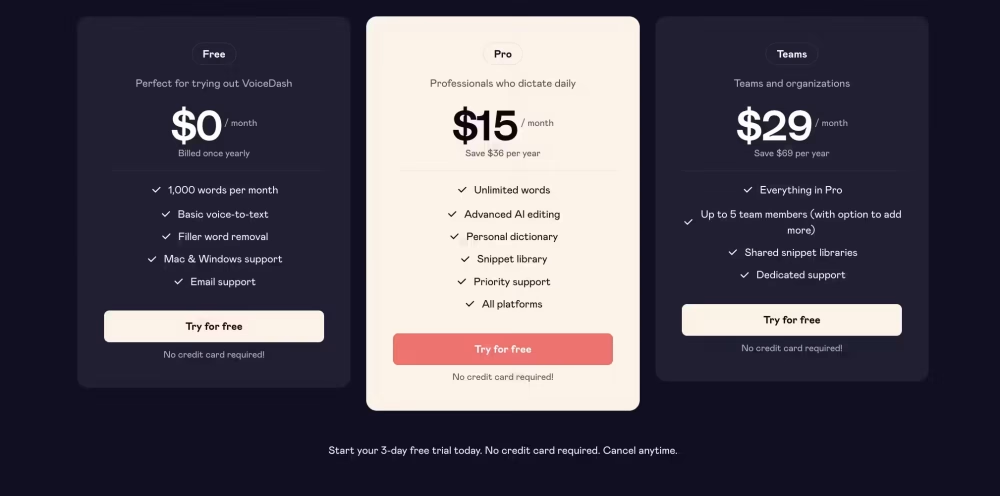
Tired of slow typing slowing you down? VoiceDash has a plan for you. Start completely free with 1,000 words per month. When you’re ready to dictate daily without limits, the Pro plan is only $15/month saving you $36 per year. Managing a team? Go Teams for $29/month with shared libraries and dedicated support. Cancel anytime, no risk, no credit card needed. Your voice, your workflow, your price.
Voicedash Review | Type Fast With Your Voice:
10 Voicedash Key Features:
01: Type Using Your Voice
Guess what, your keyboard use can drop a lot with Voicedash. You press a hotkey, speak, and your words appear as text. No extra window. No copying and pasting between tools. You talk inside Gmail, Notion, Slack, Docs, or a CRM directly. The way I see it, this feels like talking to a fast typist. Voicedash listens in real time and fills the cursor with sentences.
You pause, think, then continue your thought with no friction. The tool supports long dictation sessions for emails and scripts. You know what, this helps people with wrist pain or fatigue. Students, creators, and busy founders can speak drafts while ideas stay fresh. Long story short, you trade slow typing for natural conversation speed. That saves time and mental energy every single day.
02: Clean Natural Speech Flow
Let me think, most dictation tools copy your errors and hesitations. Voicedash does something smarter with your speech stream. It cleans filler words like “um,” “uh,” “like,” and “you know.” It also fixes grammar issues and awkward phrasing as you talk. The result feels like an editor sits between your mouth and screen. Sentences become shorter, clearer, and easier to read.
As far as I know, this supports long rants and messy brain dumps. You speak freely, then get structured paragraphs without manual cleanup. This matters for busy people who want professional text from casual speech. Emails sound sharp, not rushed or sloppy. I see your point, but some manual tweaks may still be needed. Still, the heavy lifting happens while you speak, which saves minutes each message.
03: Perfect Error‑Free Writing
To be honest, no tool gives truly perfect writing every time. Still, voicedash aims for near error‑free output in most cases. It uses AI models to spot grammar mistakes and spelling slips instantly. The app also handles punctuation and sentence breaks on its own. This leads to polished paragraphs that need only quick review.
Correct me if I’m wrong, but this rivals many writing assistants. The tool understands context, so it picks better words and phrasing. You speak casually, and it upgrades wording to a cleaner style.
This helps with client emails, proposals, scripts, and blog outlines. You avoid common errors that can hurt trust with readers. Sometimes accents or tricky names still need manual edits. Yet, in many cases, you move from voice to publish‑ready text in one pass.
04: Works In Every App
As a matter of fact, app‑agnostic tools are gold for productivity. Voicedash runs at system level on Mac and Windows desktops. You press a shortcut and dictate directly into any text box. That includes Gmail, Outlook, Notion, Slack, WhatsApp Web, or code editors.
No offense, but switching apps for dictation kills flow fast. Here, you stay in your main workspace and just talk. This design makes the tool feel invisible during daily work. You are in Chrome, then in Word, then in a CRM, still typing by voice.
The funny thing is, people forget they are using separate software. Everything just feels like the computer understands speech everywhere. This broad support is helpful for agencies and remote teams with mixed stacks. All things considered, one tool covers many platforms and workflows.
05: Learns Your Unique Words
Now that you mention it, standard voice tools hate rare names. Voicedash offers a personal dictionary feature for custom words. You can teach it brand names, product terms, and slang. Over time, the model reduces mistakes on those tricky tokens. This helps doctors, marketers, developers, and lawyers with special jargon. You can also store client names and project codes.
I couldn’t help but notice, this reduces editing time after each session. Words that once needed corrections become right on the first try. The way I see it, this feels like training a real assistant. Your language style becomes part of the system memory.
Technical subject use cases benefit most, based on user questions. Over days and weeks, accuracy improves for your niche vocabulary.
06: Automate Repetitive Text Fast
Here’s the thing, many messages repeat the same sentences daily. Voicedash solves this with snippet libraries and trigger phrases. You define blocks like signatures, intros, or canned replies. Then you speak a short trigger, and the full text appears.
This beats manual copy‑paste from some note app. Come to think of it, agencies and support teams gain a lot here. They send similar project updates, invoices, and follow‑ups every week. Snippets keep tone and structure consistent for the whole team.
You can mix snippets with fresh dictation for custom messages. That blend keeps communication fast but still personal. Over time, you build a small library of high‑converting responses. For what it’s worth, this feature alone can justify the tool cost.
07: Secure Offline Data Handling
I don’t mean to pry, but privacy stays a big concern. Voicedash follows a privacy‑first design for voice data. Processing runs locally instead of sending audio to shared servers. The fact that voice isn’t stored long term builds trust.
This matters for lawyers, therapists, and finance workers. They speak about clients, money, or health that needs care. With the help of local handling, recordings stay on your machine. No third‑party analytics tools read your words or transcripts.
I see what you mean, some users still prefer air‑gapped devices. Yet this setup feels safer than cloud‑only dictation apps.Long story short, voicedash respects user control and data safety
08: Polished Ready‑to‑Send Drafts
Let’s put it this way, rough transcripts still need editing time. Voicedash aims to give ready‑to‑send text from your speech. It combines dictation, grammar correction, and style cleanup. You talk in natural language, as if speaking to a friend. The tool turns that into clear, structured writing during dictation. This works well for outreach, support replies, and social posts.
Many users only skim the text once before sending. That reduces context switching between voice, editor, and proofreader. At the present time, few tools match this all‑in‑one flow. It fills a gap between simple speech‑to‑text and heavy writing suites.
Correct me if I’m wrong, but this suits content creators nicely. They capture ideas by voice and publish faster across channels.
09: Mac and Windows Ready
To cut a long story short, cross‑platform support matters a lot. Voicedash runs on both macOS and Windows at system level. That means one tool covers most laptops in a team. Support for iPhone and Android appears in marketing and videos.
This helps people who move between desktop and mobile often. They can record thoughts on the go and polish later.
In the near future, more platform features may arrive in updates. Early buyers still keep access under the same license tier. All things considered, cross‑device support increases long‑term value here. It also reduces tool sprawl for teams and solopreneurs.
10: Instant Speech‑to‑Text Speed
As far as I know, speed makes or breaks voice tools. Voicedash focuses on low latency speech‑to‑text conversion. You see words appear almost as fast as you speak them. This keeps your thoughts flowing without awkward pauses.
You can dictate long paragraphs without waiting for batch processing. That helps with live calls, meeting notes, and streaming thoughts. On the other hand, rare accents may slow accuracy slightly. Still, many reviewers praise the quick response time in daily use.
At this point in time, you can write full emails in under a minute. That speed compounds over weeks of regular work. I couldn’t agree more that fast feedback makes tools feel “sticky.” People keep using apps that never feel in their way.
Read More: Laxis AI Prospect Research Review| Smart B2B Lead Discovery
VoiceDash is a powerful voice-to-text tool built for professionals who want to write faster and smarter. With AI-powered editing, filler word removal, universal app support, and 38-language capability, it covers nearly every use case. Privacy-conscious users will also appreciate its no-data-storage policy. The only minor hiccup is occasional first-word cutoffs a small trade-off for an otherwise seamless dictation experience. If you type a lot daily, VoiceDash is genuinely worth trying.