

Best Keyword Research Tools (2026) — Find the Right One for You
Picking a keyword tool is a simple decision once you know what you need. You need three things: ideas for what people search, a number for how many people search, and a score for how hard the term is to rank for. A good tool gives you all three. A great tool also shows you who already ranks, and what you must beat.
We checked 7 tools live on 26 November 2026. We read each vendor’s pricing page, used the free tier where one exists, and noted what each tool does best — and where it falls short. No tool paid for its place here.
The short answer: our top 3 picks
If you want the answer now, here it is.
- Best all-round paid tool: Semrush. Start here if you run a content team or an agency. It has the biggest keyword database in this list, and it covers PPC, audits, and rank tracking in the same plan. Pro starts at $139.95 a month ($117.33 a month on annual billing).
- Best first paid tool for a solo blogger: Mangools (KWFinder). Start here if you write alone and want a clear difficulty score. Basic costs $29.90 a month on annual billing ($49 month to month). Every plan includes all five Mangools tools.
- Best free start: Google Keyword Planner + Google Search Console. Start here if your budget is $0. Keyword Planner shows real Google demand. Search Console shows the exact queries your own site already ranks for. Both are free. Neither gives you a difficulty score — that is the first thing worth paying for.
If none of those three fits, read on. The table below lets you compare all 7 in one minute.
How to choose a keyword research tool: 5 questions
Answer these five questions before you pay for anything. Your answers point straight at the right tool.
1. What is your budget? $0 means Google’s free tools. Under $30 a month means Mangools Basic or AnswerThePublic Individual. Over $100 a month means Semrush or Ahrefs. Do not pay $139 a month before your site earns money from search — start cheap, upgrade when the content pays for the tool.
2. How skilled are you? Beginners do best with a simple screen and a clear difficulty score. That is Mangools, Moz, or Google Keyword Planner. Semrush and Ahrefs are strong, but their screens are busy and they take a week to learn. If a tool needs a course before you can use it, it is the wrong first tool.
3. Do you need SEO only, or PPC too? If you run Google Ads, you need PPC data: cost per click, ad competition, and ad history. Semrush and SpyFu cover both SEO and PPC. Mangools and AnswerThePublic are SEO-only. Google Keyword Planner is built for ads first — use it to check demand, not to judge how hard a term is to rank for.
4. Do you need competitor data? If your plan is to beat specific rivals, you need their keywords. Ahrefs shows you the keywords a rival ranks for and the backlinks behind each page. SpyFu shows you the keywords a rival buys ads for, and the ad copy they ran. A tool without competitor data cannot tell you what to beat.
5. How much research will you do each day? Light use — a few terms a week — fits any free tier. Heavy use — dozens of terms a day — hits daily limits fast. Mangools Basic caps you at 100 keyword lookups a day. Ahrefs Lite caps you at 1,000 credits a month, and each report spends credits. Check the limit before you pay, not after.
The 7 best keyword research tools at a glance
| Tool | Best for | Free option | Starting price (verified 26 Nov 2026) | Standout feature |
|---|---|---|---|---|
| Semrush | All-round SEO + PPC for teams and agencies | 10 free searches a day; 7-day trial | $139.95/mo monthly; $117.33/mo annual (Pro) | Keyword Magic Tool — thousands of ideas grouped by topic and intent |
| Ahrefs | Competitor research and backlink-led keyword work | Free Keyword Generator (limited); Starter $29/mo | $129/mo monthly (Lite); annual billing saves up to 17% | Keywords Explorer with traffic potential per page |
| Mangools (KWFinder) | Beginners and solo bloggers | Limited free account | $29.90/mo annual ($49 monthly) for Basic, SEO tools only | The clearest difficulty score in this list |
| Google Keyword Planner | Free demand check from Google’s own data | Free with a Google Ads account | Free | Real Google search ranges and ad competition |
| AnswerThePublic | Questions and content ideas | 3 free searches a day | ~$11/mo annual (~$15 monthly) for Individual | Visual map of the questions people ask |
| SpyFu | Seeing what rivals rank for and bid on | No free plan; 30-day money-back guarantee | $39/mo monthly; $29/mo annual (Basic) | Kombat — keywords your rivals rank for that you do not |
| Moz Keyword Explorer | Simple research inside a full SEO suite | Free Moz account with limited searches; 30-day trial | $49/mo entry Starter plan; Standard $99/mo monthly, $79/mo annual | Keyword Lists that track and rank your targets |
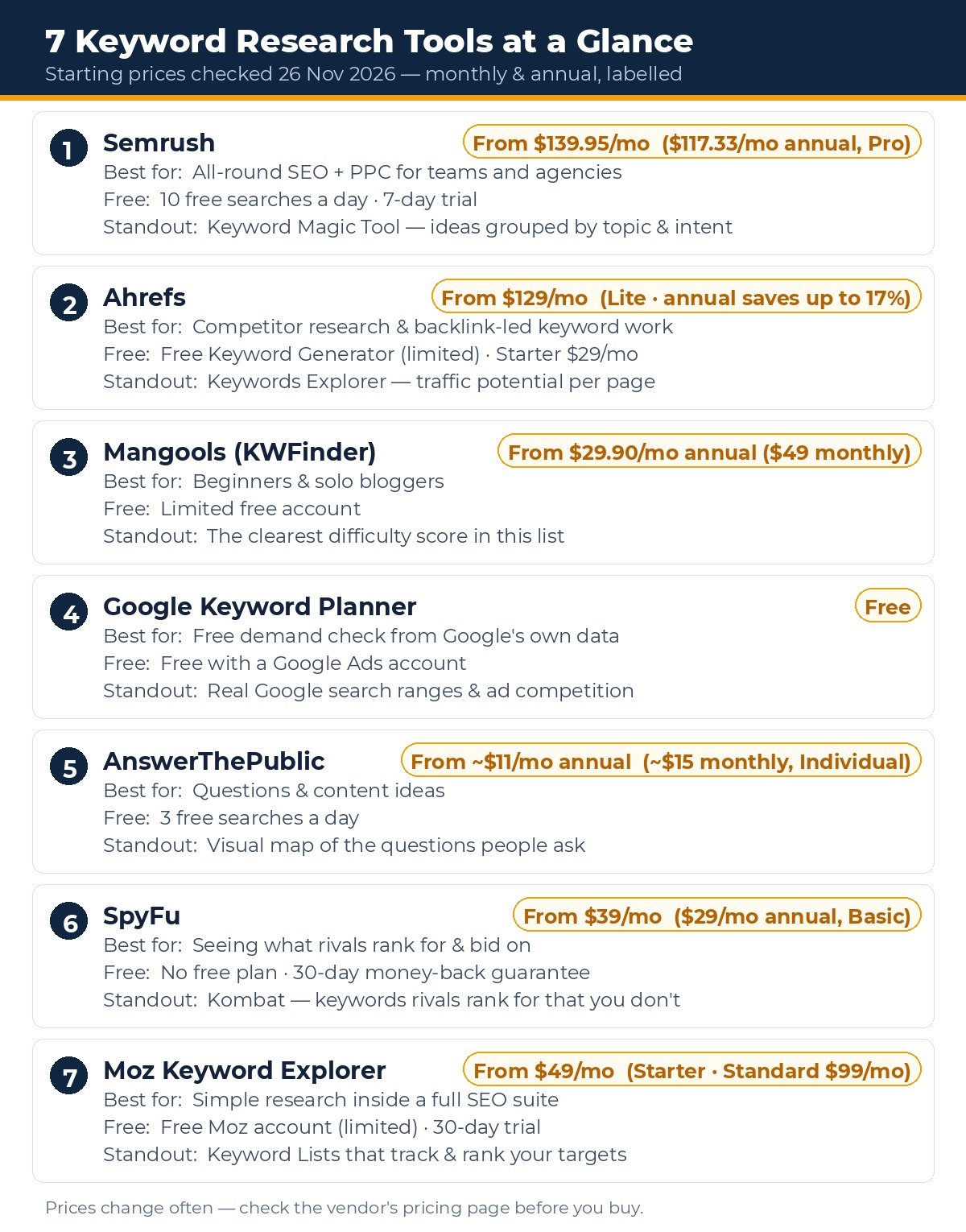
Prices change often. Check the vendor’s pricing page before you buy. The prices above were read on 26 November 2026.
The 7 best keyword research tools for SEO
1. Semrush — best all-round tool
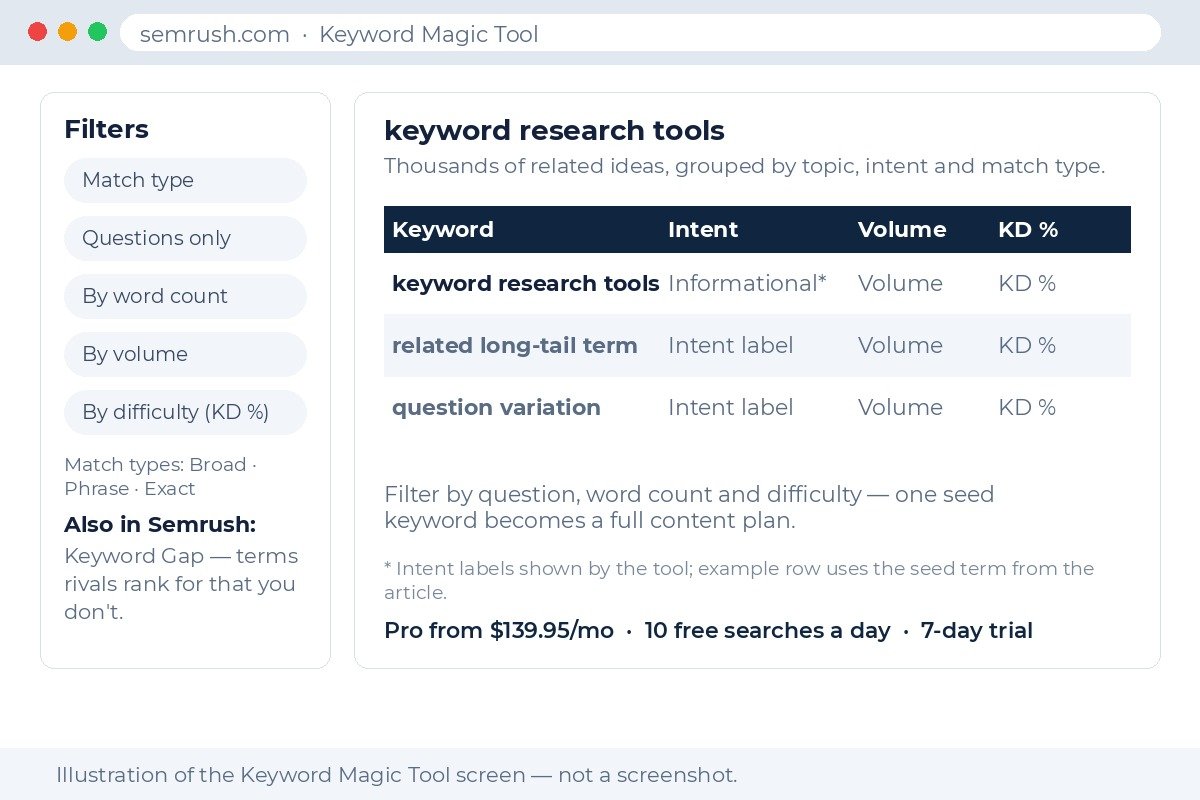
Semrush is the biggest suite in this list. Its keyword database holds over 25 billion keywords across 142 countries. That size matters when you research in more than one market, or when you need long-tail ideas in a small niche.
The Keyword Magic Tool is the reason most people buy Semrush. Type in one seed keyword and it returns thousands of related terms, grouped by topic, intent, and match type. You can filter by question, by word count, and by difficulty. It turns one vague topic into a full content plan.
The Keyword Gap tool is the second reason. Enter your site and two or three rivals. It shows you the keywords they rank for that you do not. Those gaps are your next articles.
What it does well: the largest database here; intent labels on keywords; PPC data, site audits, rank tracking, and backlink tools in the same plan. A new AI Visibility Toolkit tracks how often your content shows up in ChatGPT, Perplexity, and Gemini answers.
Where it falls short: it is the most expensive tool in this list, and the screen is busy. Beginners need a week to feel at home. Volume numbers run high — treat them as a guide, not a promise.
Pricing: Pro costs $139.95 a month, or $117.33 a month on annual billing. Guru costs $249.95 a month ($208.33 annual). Business costs $499.95 a month ($416.66 annual). The free plan allows 10 keyword searches a day. A 7-day free trial is available. Semrush also sells newer AI-focused plans from $199 a month — check which plan the checkout shows before you buy.
Who it is for: content teams, agencies, and serious site owners who will use the full suite. If you only need keyword ideas, it is more tool than you need.
2. Ahrefs — best for competitor research
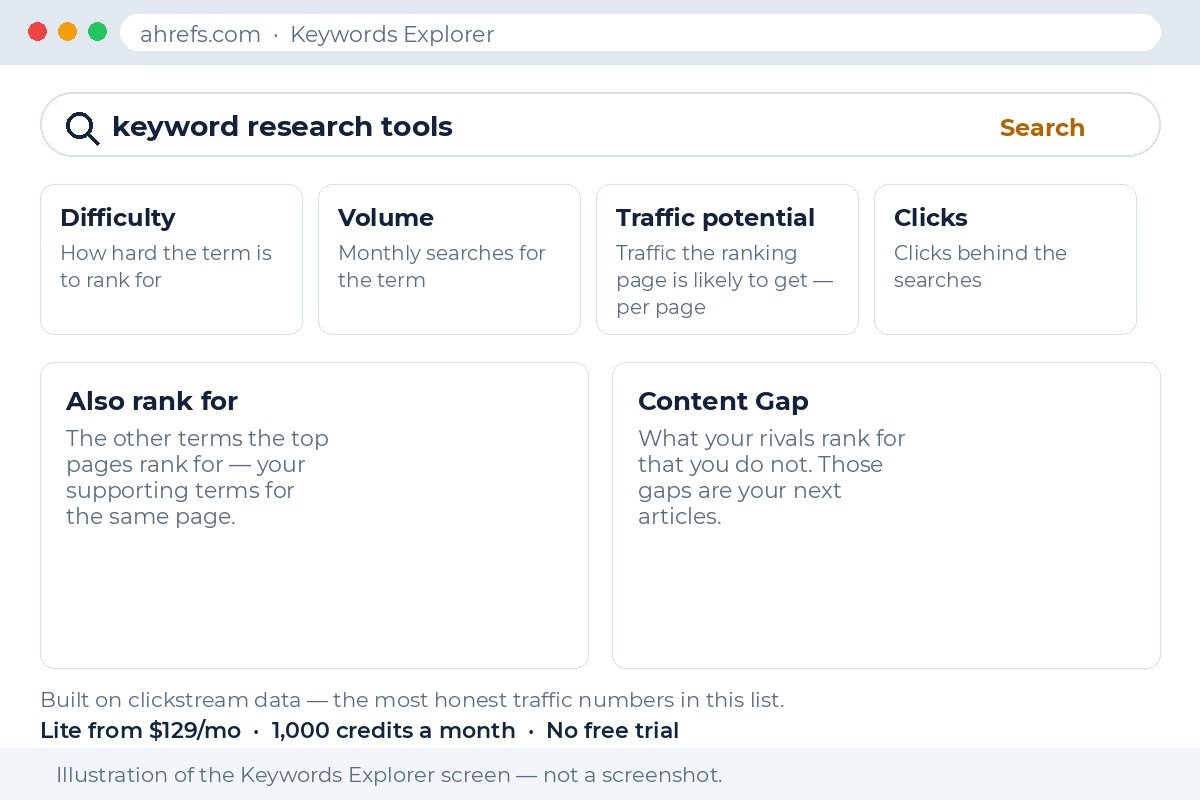
Ahrefs is the specialist’s tool. Its Keywords Explorer is built on clickstream data — real browsing behaviour — so its traffic numbers are the most honest in this list. It does not just tell you how many people search a term. It tells you how much traffic the page that ranks for that term is likely to get. That is the number that matters when you decide what to write.
Type in a keyword and you get difficulty, volume, traffic potential, and click data. The “also rank for” report shows you the other terms the top pages rank for. The Content Gap tool shows you what your rivals rank for that you do not.
What it does well: the best backlink index in this list, and keyword research sits on top of it — you can see the links behind every ranking page. Traffic potential is measured per page, not per keyword. The screen is clean and fast.
Where it falls short: Lite costs $129 a month and runs on credits — 1,000 credits a month, and each report spends credits. Run a lot of reports and you hit the cap. There is no free trial. The tool assumes you know what you are looking for; it holds your hand less than Mangools or Moz.
Pricing: Lite costs $129 a month. Standard costs $249 a month. Advanced costs $449 a month. Enterprise costs $1,499 a month. Annual billing saves up to 17%, but Ahrefs does not publish a full annual price list — check the checkout. A separate Starter product costs $29 a month. The free Keyword Generator gives you a small set of ideas and questions for Google, Bing, YouTube, and Amazon.
Who it is for: SEOs who care about traffic value and backlinks, and teams that plan content around what rivals already win.
3. Mangools (KWFinder) — best first paid tool
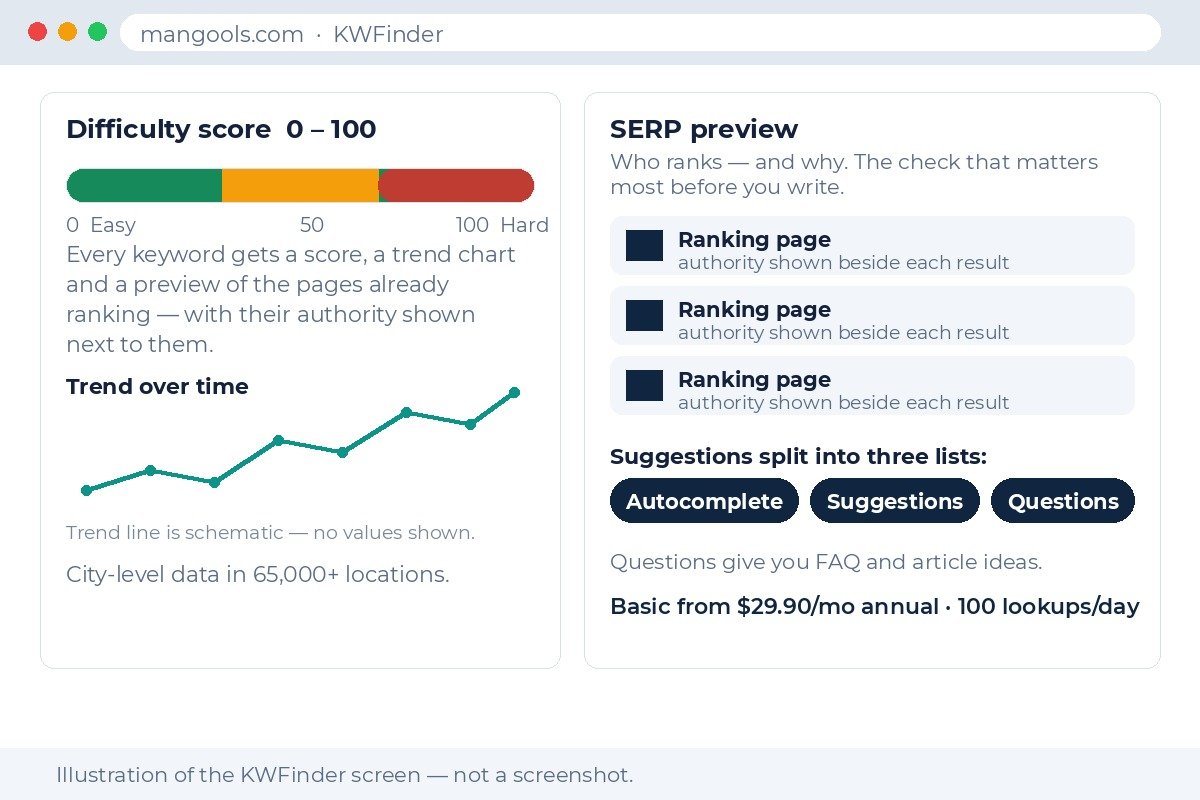
KWFinder is the keyword tool inside the Mangools suite, and it has the clearest difficulty score we tested. Every keyword gets a score from 0 to 100, a trend chart, and a preview of the pages already ranking — with their authority shown next to them. You can see in seconds whether a term is winnable for a small site.
Suggestions split into three lists: autocomplete, suggestions, and questions. That split is useful. Autocomplete gives you long-tail terms. Questions give you FAQ and article ideas. The SERP preview shows you who ranks and why, which is the check that matters most before you write.
What it does well: the easiest screen in this list; difficulty scores that a beginner can read at a glance; city-level data in 65,000+ locations, which helps local research. Every plan includes all five Mangools tools (KWFinder, SERPChecker, SERPWatcher, LinkMiner, SiteProfiler).
Where it falls short: daily limits bind fast — Basic allows 100 keyword lookups and 100 SERP lookups a day. There is no PPC data, no site audit, and no backlink index as deep as Ahrefs. Mangools now sells two bundles, so check whether the price you see includes AI Search Watcher PRO or not.
Pricing: Basic costs $49 a month, or $29.90 a month on annual billing, for the SEO tools only. The same plan with AI Search Watcher PRO costs $61 a month, or $37.70 a month on annual billing. Premium costs $69 a month ($44.90 annual). Agency costs $129 a month ($89.90 annual). A limited free account is available, and paid plans carry a 10-day trial.
Who it is for: bloggers, affiliate sites, and freelancers buying their first paid keyword tool. If you publish a few articles a week, Basic is enough.
4. Google Keyword Planner — best free baseline
Keyword Planner is free, and it is the only tool in this list that reads Google’s own data. It shows you search volume ranges, ad competition, and cost-per-click estimates for any term. It is built for advertisers, so use it to check demand — not to judge how hard a term is to rank for. It gives you ranges (for example, 1,000–10,000 searches a month), not exact numbers, and it gives you no difficulty score at all.
That limit is also its strength. When a paid tool says a term gets 5,000 searches a month and Google’s own range says 1,000–10,000, the two agree and you can trust the direction. When they disagree, trust Google’s range and dig deeper.
What it does well: free; direct Google data; useful for commercial terms where ad demand tells you the term has buying intent; good for grouping terms into ad groups and content clusters.
Where it falls short: no difficulty score; volume comes in wide ranges; you need a Google Ads account to use it (you do not need to spend money on ads). The competition score measures ad competition, not organic difficulty. Do not mix the two up.
Pricing: free with a Google Ads account.
Who it is for: everyone. Use it as the free check under any paid tool. If your budget is $0, pair it with Search Console (see below) and you have a working research stack.
5. AnswerThePublic — best for questions and content ideas
AnswerThePublic turns one seed keyword into a visual map of the questions people ask: what, why, how, when, and comparisons. It reads autocomplete data from Google, Bing, YouTube, TikTok, Instagram, and Amazon. One search returns hundreds of questions, and each question is a possible article, FAQ entry, or video.
It gives you no volume numbers you can trust and no difficulty score. That is fine — that is not its job. Its job is ideas. Use it at the start of your research, when your list is empty. Then take the best questions to a tool like Semrush or Mangools and check volume and difficulty there.
What it does well: the fastest way to find real questions; visual map is easy to read; covers YouTube and TikTok as well as Google; free tier needs no account.
Where it falls short: free users get only 3 searches a day, and export is image-only — CSV export needs a paid plan. No volume or difficulty data. Some suggestions are off-topic and need filtering by hand.
Pricing: free for 3 searches a day. Individual costs about $11 a month on annual billing (about $15 month to month) for 100 searches a day, CSV export, and search listening. Pro costs $99 a month. A 7-day free trial is available on monthly plans.
Who it is for: bloggers and content writers who plan articles around questions, and anyone building FAQ sections.
6. SpyFu — best for spying on rivals
SpyFu answers one question better than any tool in this list: what are my rivals doing? Type in a rival’s domain and you see the keywords they rank for, the keywords they buy ads for, the ad copy they ran, and how long each ad ran. Ads that ran for years are usually ads that made money. That history goes back over a decade on higher plans.
The Kombat tool is the standout. It compares your site with two rivals and shows you the keywords they rank for that you do not, the keywords you share, and where you beat them. Those gaps are your easiest wins.
What it does well: the deepest PPC history here — ad copy, spend estimates, and landing pages; unlimited searches on paid plans; rank tracking and a site audit included; cheap for what it covers.
Where it falls short: there is no free plan — only a 30-day money-back guarantee. Rank tracking updates weekly, not daily. Basic has no API and no ad history beyond 6 months. It covers Google Ads only, so it says nothing about Meta or TikTok ads.
Pricing: Basic costs $39 a month, or $29 a month on annual billing. Pro + AI costs $119 a month ($89 annual). Team costs $249 a month ($187 annual). Basic includes 1 user, 10,000-row results and exports, and 5,000 weekly tracked keywords.
Who it is for: SEOs and PPC buyers who plan around rivals — especially in niches where ad history shows what already sells.
7. Moz Keyword Explorer — best simple suite
Moz Keyword Explorer is the simple option inside a full SEO suite. Type in a term and you get volume, difficulty, organic click-through rate, and a basic view of the ranking pages. The Priority score blends volume, difficulty, and click rate into one number, so you can sort a long list fast.
Keyword Lists are the best feature. Save terms into lists, track them over time, and watch which ones move. For a small team that plans content in batches, lists keep the research organised instead of scattered across spreadsheets.
What it does well: the cleanest screen of the big suites; Priority score saves sorting time. The suite behind it covers rank tracking, site audits, and backlinks. A 30-day free trial lets you test everything.
Where it falls short: the keyword database is smaller than Semrush or Ahrefs, so long-tail ideas in small niches are thinner. Moz rebuilt its plans in 2026 around SEO plus AI search. Check which plan the checkout shows. The entry Starter plan is $49 a month and the main Standard plan is $99 a month ($79 on annual billing).
Pricing: entry Starter plan $49 a month. Standard $99 a month, or $79 a month on annual billing. Medium $179 a month ($143 annual). Large $299 a month ($239 annual). A free Moz account gives you a small number of searches a month. A 30-day free trial is available on paid plans.
Who it is for: small businesses and bloggers who want one simple suite for keywords, tracking, and audits — without learning a heavy platform.
Free tools that are worth your time
Paid tools are not the only option. These four free tools cover real jobs, and they pair well with any tool above.
- Google Search Console (free). The only tool that shows the exact queries your own site already ranks for, with clicks, impressions, and position. Use it to find terms where you rank 8–20 — those are your easiest wins. Open the Performance report, sort by impressions, and look for high impressions with few clicks. That gap is usually a title problem, not a ranking problem.
- Google Trends (free). Compare up to five terms at once and see whether interest is rising, falling, or seasonal. Use it before you commit to an angle — a term that peaked two years ago is a bad bet for a new article.
- Ahrefs Free Keyword Generator (free). A fast way to get ideas and question terms for Google, Bing, YouTube, and Amazon, with volume and difficulty. Limited to a small set per search, but enough for a quick check.
- Keywords Everywhere (pay-as-you-go credits). A browser add-on that shows volume and difficulty right inside Google search results while you browse. Cheap, because you buy credits instead of a monthly plan. Good for quick checks while you research.
Free vs paid: when free is enough, and when to pay
Free is enough when you publish a few articles a month, you already know your niche, and you only need ideas and a rough sense of demand. Google Keyword Planner, Search Console, Trends, and AnswerThePublic’s free tier cover that. You can run a small blog for a year on free tools alone.
Pay when free tools cost you more time than the subscription costs. The signs are clear: you publish every week and need difficulty scores; you waste articles on terms you cannot rank for; you need rival data to plan content; or you spend hours copying numbers between tools. The first paid tier that fixes those problems is usually the right one. For most solo publishers, that is Mangools Basic at $29.90 a month on annual billing. AnswerThePublic Individual costs about $11 a month if you only need questions.
Do not pay $100+ a month before your site earns from search. A $139 tool does not rank a site that has no content plan. Buy the cheap tool, publish on a schedule, and upgrade when the traffic pays for the upgrade.
Keyword tools by use case
Beginners. Start with Google Keyword Planner and Search Console. Add Mangools Basic when you want difficulty scores. Avoid Semrush and Ahrefs until you know what a difficulty score means and how to read a SERP. A simple tool you use beats a strong tool you avoid.
Bloggers. Mangools Basic is the best fit: cheap, simple, and the difficulty score keeps you out of unwinnable SERPs. Add AnswerThePublic free tier for question ideas. If you hunt weak SERPs at scale, add a weak-SERP scanner such as LowFruits alongside your main tool. It flags terms where forums and thin pages rank. Those are the terms a small blog can win.
Agencies and content teams. Semrush Pro is the default: one plan covers keywords, PPC, audits, tracking, and client reports. Ahrefs Lite is the pick if your work leans on backlinks and traffic value. Budget for extra seats — Semrush charges per extra user, and Ahrefs Lite allows only one user with two more at $40 each.
Local SEO. Mangools wins here: city-level data in 65,000+ locations lets you check a term in one city, not just one country. Pair it with Google Business Profile data and Search Console queries for your service area. Semrush and Ahrefs also work, but you pay for depth you may not use. For local keyword method, read our guide to local keyword research on this site — and if you run a local business, our sister site MentorsBoss publishes local SEO guides for service businesses.
How to use a keyword tool: a short workflow
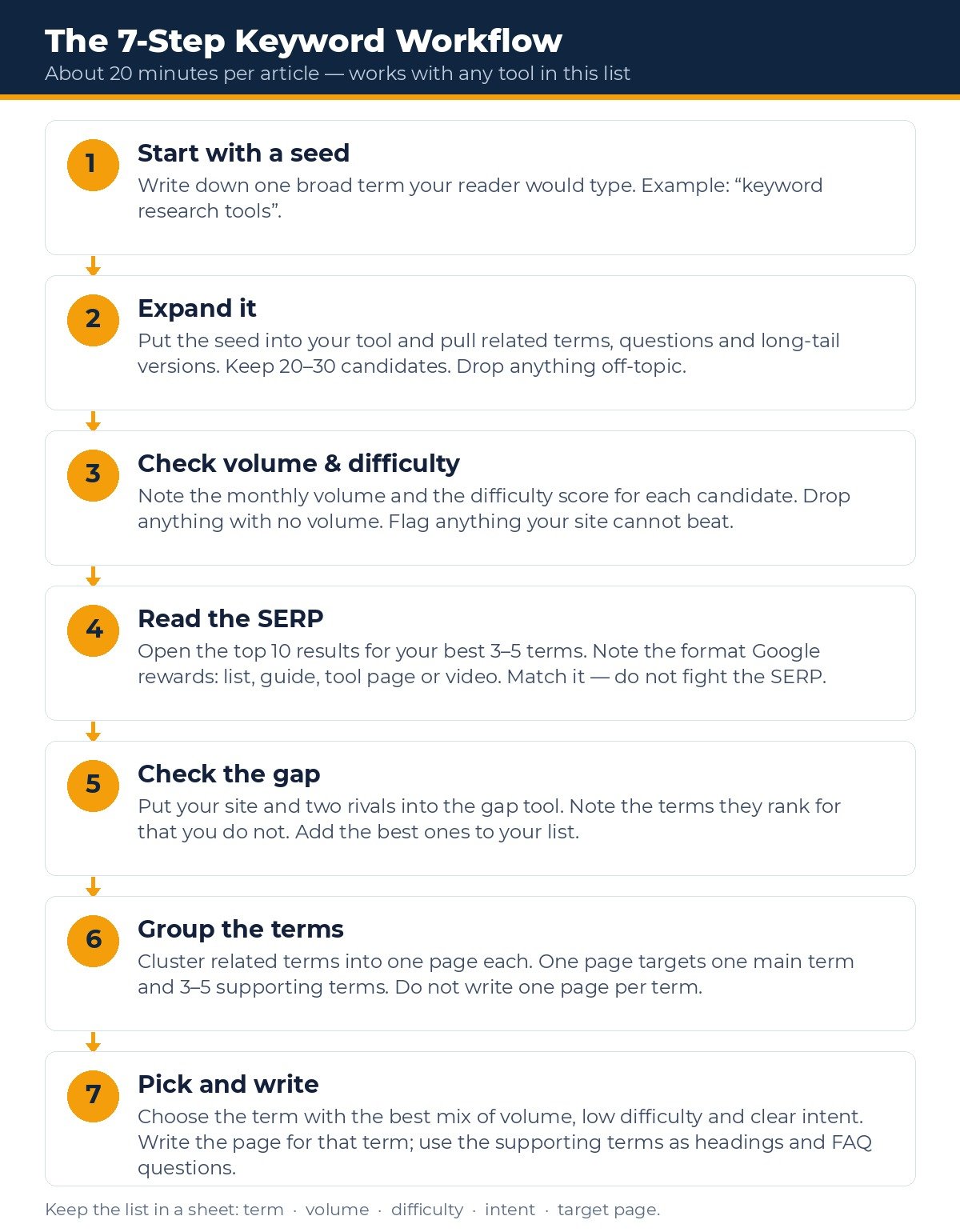
Use this workflow for every article. It takes 20 minutes once you know the steps.
- Start with a seed. Write down one broad term your reader would type. Example: “keyword research tools”.
- Expand it. Put the seed into your tool and pull the related terms, questions, and long-tail versions. Keep 20–30 candidates. Drop anything off-topic.
- Check volume and difficulty. For each candidate, note the monthly volume and the difficulty score. Drop anything with no volume. Flag anything with a difficulty score your site cannot beat — check who ranks first, and if the top 10 are all big brands, drop the term.
- Read the SERP. Open the top 10 results for your best 3–5 terms. Note the format Google rewards: list, guide, tool page, or video. If your page type does not match, change your plan — do not fight the SERP.
- Check the gap. Put your site and two rivals into the gap tool. Note the terms they rank for that you do not. Add the best ones to your list.
- Group the terms. Cluster related terms into one page each. One page targets one main term and 3–5 supporting terms. Do not write one page per term.
- Pick and write. Choose the term with the best mix of volume, low difficulty, and clear intent. Write the page for that term, and use the supporting terms as headings and FAQ questions.
Keep the list in a sheet with columns for term, volume, difficulty, intent, and target page. That sheet is your content plan.
Frequently asked questions
What is the best keyword research tool for SEO?
It depends on your budget and your site. Semrush is the best all-round paid tool for teams. Mangools (KWFinder) is the best first paid tool for a solo blogger. Google Keyword Planner plus Search Console is the best free start. Pick by budget and skill, not by which tool is biggest.
What is the best free keyword research tool?
Google Keyword Planner, paired with Google Search Console. Keyword Planner shows real Google demand. Search Console shows the exact queries your own site already ranks for. AnswerThePublic’s free tier (3 searches a day) is the best free source of question ideas. Free tools give you ideas and demand — they do not give you a difficulty score.
Which keyword research tool is best for beginners?
Mangools (KWFinder). Its difficulty score is the easiest to read, its screen is the simplest, and Basic costs $29.90 a month on annual billing. Google Keyword Planner is the best free beginner tool. Avoid Semrush and Ahrefs as a first tool — they are strong, but they take a week to learn.
Semrush vs Ahrefs: which is better for keyword research?
Semrush is better if you want the biggest database, PPC data, and the full suite in one plan. Ahrefs is better if you care about traffic value per page and backlink data behind each ranking page. For most teams, Semrush wins on breadth. For link-led content strategy, Ahrefs wins on depth. Both cost about the same at entry level — Semrush Pro $139.95 a month, Ahrefs Lite $129 a month.
Is Google Keyword Planner still free?
Yes. It is free with a Google Ads account. You do not need to spend money on ads to use it. It shows volume ranges and ad competition. It does not show a difficulty score, and its volume numbers come in wide ranges instead of exact figures.
What is keyword difficulty?
Keyword difficulty is a score, usually 0–100, that estimates how hard it is to rank on page 1 for a term. Each tool scores it differently — most use the backlink strength of the pages already ranking. Treat every score as a guide, not a fact. Always open the top 10 results and judge for yourself: if the top pages are forums and thin blogs, the term is easier than the score says. If they are big brands with strong links, it is harder.
How much should I pay for a keyword research tool?
Start at $0 with Google’s free tools. Pay about $11–$30 a month (AnswerThePublic Individual or Mangools Basic) when you publish weekly and need difficulty scores. Pay $129–$140 a month (Ahrefs Lite or Semrush Pro) only when your site earns from search, or when you run a team. Do not pay for the big plan before the content pays for it.
Verdict: which tool for whom
- $0 budget: Google Keyword Planner + Google Search Console + AnswerThePublic free tier. That stack finds ideas, checks demand, and shows your own ranking queries.
- Solo blogger, first paid tool: Mangools Basic, $29.90 a month on annual billing. Clear difficulty scores, simple screen, all five tools included.
- Questions and content ideas only: AnswerThePublic Individual, about $11 a month on annual billing.
- Rival research and PPC: SpyFu Basic, $39 a month ($29 annual), for ad history and Kombat gaps.
- Agency or content team: Semrush Pro, $139.95 a month ($117.33 annual). If your work leans on backlinks and traffic value, take Ahrefs Lite at $129 a month instead.
- Simple full suite: Moz Standard, $99 a month ($79 annual), with a 30-day trial.
The tool does not rank your site. The workflow does. Pick the cheapest tool that gives you ideas, volume, and difficulty — then publish on a schedule and check Search Console every week. That is how a keyword tool earns its price.
